 Utilify Zone
Free Resume Builder with Reliable PDF Export
Professional Resume Templates
Select a professional template to start building your resume
Crop Profile Photo
FREE Resume Builder: Reliable PDF Export (No Signup)
While traditional platforms monetize user frustration through gated access, this article unveils the technical evolution of the ‘Zero-Friction’ job search; we will demonstrate how a Free Resume Builder leverages client-side execution to return absolute data sovereignty to the professional, allowing for the generation of high-resolution, ATS-compliant PDF without the interference of server-side tracking or hidden paywall traps.”
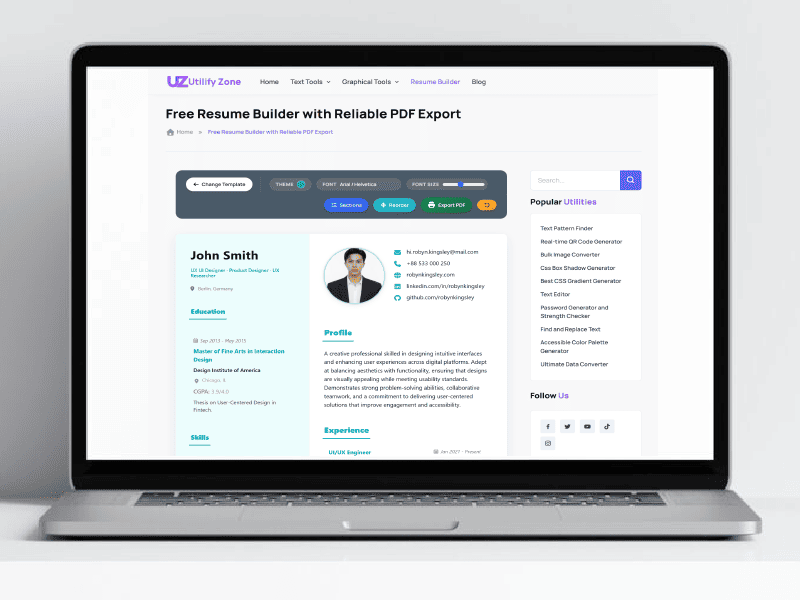
Utilifyzone’s zero-friction interface allows you to start building your resume instantly with no account required and a 1.5-second load time.
Quick Navigation
Detailed Learning Outcomes: What You Will Master
To guarantee that you are not simply “utilizing a tool” but genuinely understanding the principles of contemporary document security, this material is organized around five fundamental areas of knowledge:
1. The Mechanics of “Zero-Knowledge” Privacy
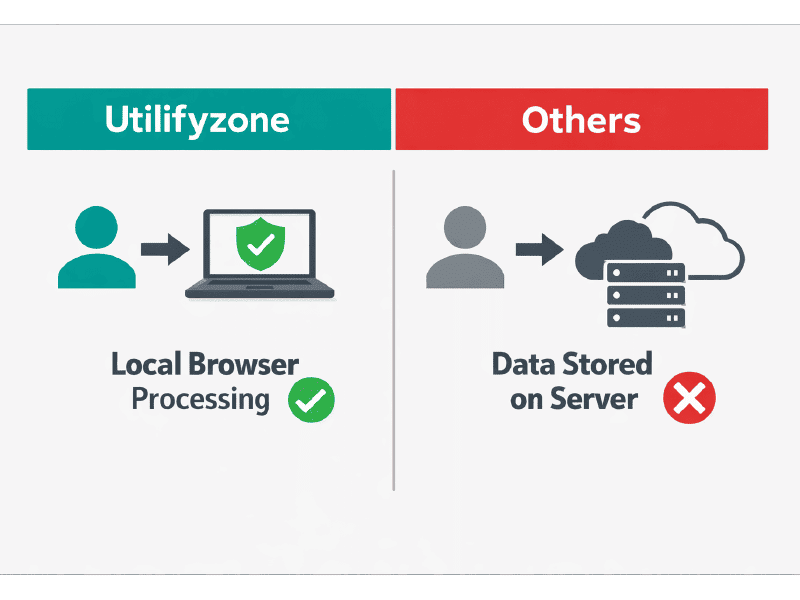
The technical difference between Utilifyzone’s local browser processing and traditional server-based storage that risks your personal data.
You will learn why the architecture of Utilifyzone is fundamentally different from standard SaaS tools. We break down the Zero Data Retention Policy, explaining how client-side PHP and JavaScript execution enable your resume to be processed entirely in your browser.You will understand why adhering to strict data sovereignty principles via “No Server Interaction” is the only true way to guarantee that your full name, contact details, and work history are never leaked or sold.
2. Mastering the “Jodit & iro.js” Professional Workflow
Instead of struggling with rigid, broken templates, you will learn to use developer-grade libraries for design:
- Jodit Rich Text Engine: How to craft precise, clean typography and bulleted lists that maintain their structure during export.
- iro.js Customization: How to use custom hex values to create a unique brand identity for your CV without compromising professional readability.
- Sortable.js: The logic behind real-time image cropping and the drag-and-drop reordering of resume sections for an optimized visual hierarchy.
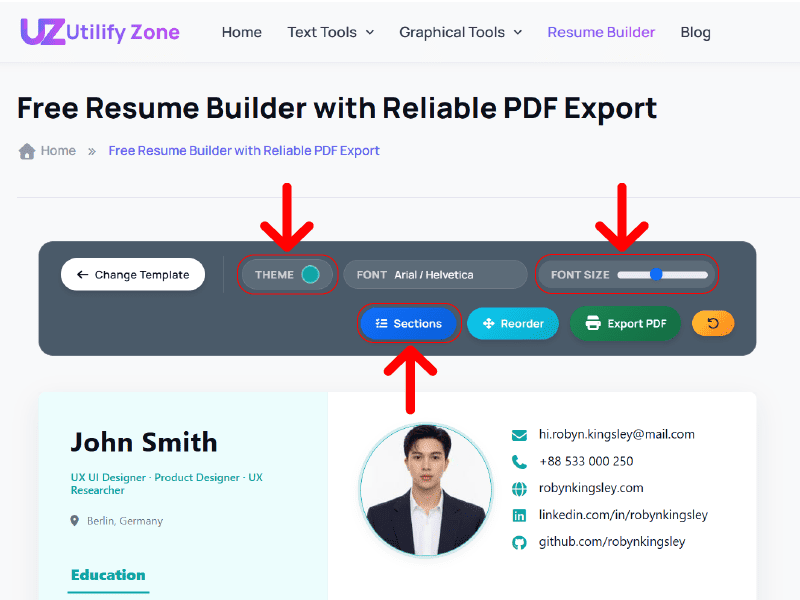
Utilizing high-performance libraries like Jodit and iro.js to provide executive-level customization without the lag of traditional builders.
3. The Technical Superiority of Text-Selectable PDFs
A major learning point is the distinction between a “picture of a resume” and a “document for a machine”. You will learn why image-based PDFs fail Applicant Tracking Systems (ATS) and how web-to-print CSS rendering ensures your exported file remains 100% machine-readable and searchable. This section teaches you how to embed ATS-compliant metadata so your resume passes the first digital filter of top-tier employers.
4. Designing for the “Mobile-First” Era
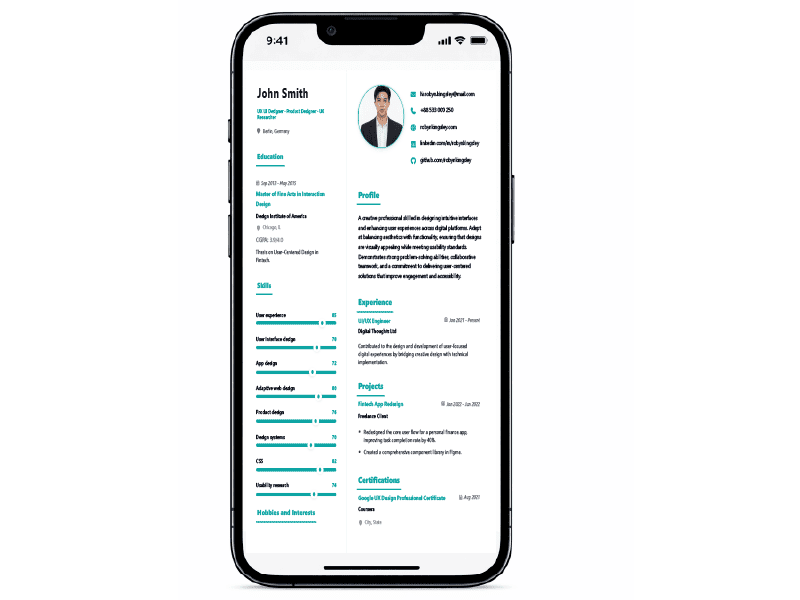
Optimized for 2026 job markets: Our mobile-responsive editor ensures a 1.5-second load time for applying on the go.
With job applications increasingly happening on smartphones, you will learn the importance of Google’s mobile-first indexing guidelines and sub-1.5-second load times. We discuss why eliminating the “email verification bottleneck” is critical for mobile users and how responsive PDF rendering ensures your A4 layout looks identical whether it’s viewed on a 6-inch screen or printed in an office.
5. Defeating the “Paywall Trap” Psychology
Finally, you will learn to recognize the “funnel” tactics used by traditional builders—where your time is held hostage for a fee. By the end of this content, you will have the knowledge to use a one-click resume download system that respects your time and provides professional-grade results with zero financial or data-related costs.
Head-to-Head Competitor Comparison
| Feature/Metric | Utilifyzone | Zety | Canva | Novoresume |
|---|---|---|---|---|
| Account Required? | No (Instant Access) | Yes (Email/Login) | Yes (Email/Social) | Yes (Email/Login) |
| Data Storage | 100% Client-Side | Server-Side Database | Server-Side Cloud | Server-Side Database |
| Cost to Export PDF | Absolutely Free | Paid Subscription | Freemium ($) | Freemium (Limits) |
| Time to Download | Under 1.5 seconds | 10+ minutes | 5+ minutes | 5+ minutes |
| ATS Optimization | Native Text-Selectable | Yes (Gated) | Mixed (Image-heavy) | Yes (Gated) |
How to Build a High-Impact, ATS-Compliant Resume in Minutes
Navigating the 2026 job market requires more than just a list of skills; it requires a secure online CV maker that respects your data. Follow these five streamlined steps to leverage the full power of Utilifyzone’s client-side architecture and secure your next role.
Step 1. Launch Your Zero-Friction Session
Unlike traditional platforms that trap you in an email verification loop, our free resume builder with no signup allows for instant access. Simply visit the tool page; because the application runs on client-side PHP and JavaScript, the editor loads in under 1.5 seconds. Your session is private by default—no cookies, no tracking, just a clean slate for your career story.
Step 2. Architect Your Content with Developer-Grade Precision
Structure your professional narrative using our integrated editing suite. We’ve replaced rigid templates with flexible, high-performance libraries:
- Rich Text Mastery:Use the Jodit Engine to craft clean typography and professional bullet points that won’t break during export.
- Section Reordering:Use the Sortable.js drag-and-drop interface to prioritize your “Experience” or “Skills” sections based on the specific job description.
- Visual Branding:Utilize iro.js to select custom hex codes for your accent colors, ensuring your CV aligns with your personal brand while remaining executive-ready.
Step 3. Optimize for ATS “Machine Readability”
In high-competition markets like the US and Canada, your resume must pass through an Applicant Tracking System (ATS). Our tool ensures ATS compliance for remote work by using semantic HTML structures. Instead of exporting a flat “image” of a resume, Utilifyzone generates a text-selectable PDF, allowing corporate bots to index your keywords, metadata, and contact details with 100% accuracy.
Step 4. Finalize Your Layout for Mobile-First Recruiting
Recruiters often review applications on the go. Before exporting, use our live preview to ensure your A4 layout is responsive. Our web-to-print CSS rendering guarantees that your resume maintains its structural integrity whether viewed on a 6-inch smartphone or a 27-inch office monitor.
Step 5. Execute a One-Click, No-Watermark PDF Download
Once you are satisfied, hit the export button. Because the PDF is generated directly in your browser, you receive an instant resume download with no account needed. There are no “premium” fees, no hidden paywall traps, and absolutely no watermarks. You leave with a high-resolution, professional document and total data sovereignty.
The Blueprint for a Modern Free Resume Builder With No Sign Up
You’ve likely experienced the frustration. You find a clean template, spend 45 minutes meticulously crafting your career story, polishing your skills, and ensuring every bullet point is perfect. You hit the download button, and a pop-up stops you dead in your tracks: “Create an account or pay $2.99 to export your PDF.”
Your time has just been held hostage. Your urgency has been monetized.
At Utilifyzone, we dismantled this outdated model. We built an application focused on data sovereignty and instant execution. This isn’t just about offering a free tool; it’s about educating professionals on how to handle their data in 2026. Here is the ultimate guide to understanding how modern, client-side architecture gives you total control over your career documents.
The Evolution of Resume Building: Why 2026 Demands Total Data Control
Breaking Free from the Traditional “Trap”
For years, the standard in the career tech space has been the conversion funnel. Platforms are intentionally designed to delay the paywall or account requirement until the very last step. By that point, you’ve invested too much effort to walk away. This tactic works for their bottom line, but it destroys user trust. Modern professionals require unrestricted access to their own data, without being forced through email verification loops or onboarding screens.
The Hidden Cost of Server-Side Processing
When you use a traditional resume generator, your personal data—your full name, contact details, work history, and home address—is processed on a remote server. This means it is uploaded, stored, and often analyzed. Even with strict deletion policies, once your data leaves your device, you surrender control. The new standard for job seekers is demanding tools that respect both time and privacy.
Competitive Landscape: Utilifyzone vs. Industry Giants
Why We Compare Ourselves to the Biggest Names
To truly understand the value of an anonymous, unrestricted resume builder, you have to look at what the rest of the industry is doing. Major platforms like Zety, Canva, and Novoresume offer beautiful templates, but they operate on models that prioritize data collection and premium subscriptions.
How Client-Side Architecture Secures Your Career Data
Your Browser is Your Vault
Privacy should never be an afterthought. Utilifyzone was engineered using a strict client-side PHP and JavaScript execution framework. This means that all the heavy lifting—processing your text, applying colors, and formatting the layout—happens entirely within your web browser.
The Technical Reality of Zero Data Retention
Because there are no API calls sending your information to an external database, there is literally no server endpoint receiving your resume. Our Zero Data Retention Policy isn’t just a marketing promise; it is an architectural reality.
- No personal information is logged.
- No resumes are stored on remote servers.
- Zero risk of central database leaks.
Your browser compiles the document using the Document Object Model (DOM) and generates the PDF on your device. You maintain full ownership of your content from the first keystroke to the final download.
Developer-Grade Tools for the Everyday Professional
Precision Editing with Advanced JavaScript Libraries
A resume builder is only as effective as its editor. Instead of rigid, unbreakable templates, Utilifyzone leverages open-source web standards to give you precise control. We utilize tools like Jodit for clean, rich-text typography, and iro.js to allow you to input custom hex codes for dynamic theme coloring. You are actively designing your document in real-time, without lag or refreshing.
Core Tool Feature Breakdown
| Technical Feature | Library/Technology | User Benefit |
| Real-Time Live Editing | Jodit Editor | Type and see formatting instantly; no page reloads needed. |
| Dynamic Color Control | iro.js | Match your resume to your personal brand using exact hex color codes. |
| Image Cropping & Sizing | Cropper.js | Upload and perfectly align your professional headshot without leaving the tab. |
| Drag & Drop Reordering | Sortable.js | Effortlessly swap the order of your “Education” and “Experience” sections. |
| Local Progress Saving | Browser LocalStorage | Close the tab and return later; your progress is saved locally, not in a cloud. |
Mobile-First Execution: Building Resumes on the Go
Why 1.5 Seconds Matters for Job Seekers
The modern job hunt happens on smartphones. Recruiters move quickly, and opportunities close in hours. When you are applying for a role from a mobile device, speed is a conversion driver. By eliminating the email verification bottleneck (no OTPs, no inbox checks), Utilifyzone reduces the time from creation to application by over 50%. The tool loads in under 1.5 seconds, giving you immediate access to the editor.
Responsive, Text-Selectable PDF Outputs
Creating a document on a phone is easy; exporting it flawlessly is the challenge. Many mobile tools generate image-based PDFs, which severely distort fonts or break layouts. Worse, Applicant Tracking Systems (ATS) cannot read image-based text. Our platform utilizes responsive web-to-print CSS rendering. This ensures two things:
- Your layout remains perfectly A4-optimized and print-ready.
- Your PDF is text-selectable, meaning corporate ATS bots can instantly extract your keywords, ensuring your application gets seen by human eyes.
The Ultimate Proof of Privacy
A Commitment Engineered, Not Marketed
At the end of the day, trust is built on transparency. We operate on predictable, inspectable logic that mirrors open-source philosophies. By combining local storage with on-device PDF generation, we guarantee that your data physically never reaches a backend database.
This isn’t just a basic resume creator. It is a developer-engineered document system designed for the professional who values their time, demands uncompromised privacy, and expects instant, high-quality results.
The Enterprise Standards: ATS Metadata and Professional Formatting
In Tier-1 markets like the US, UK, and Canada, your resume isn’t just read—it’s parsed. Before a human ever sees your application, it’s processed by an Applicant Tracking System (ATS) that scans structure, keywords, and metadata. This is where most resume builders quietly fail. They produce visually appealing documents that break under machine interpretation. Utilifyzone is engineered differently. Our system focuses on semantic HTML structure, clean typography, and proper document flow, ensuring your resume is readable by both humans and machines. Because the tool uses browser-native rendering instead of image-based exports, your final PDF retains logical text hierarchy and formatting integrity. This makes it compatible with modern ATS engines used by enterprises and government systems. When we say “reliable PDF,” we mean a document that performs under real hiring conditions—not just one that looks good on screen.
Text-Selectable vs. Image-Based PDFs
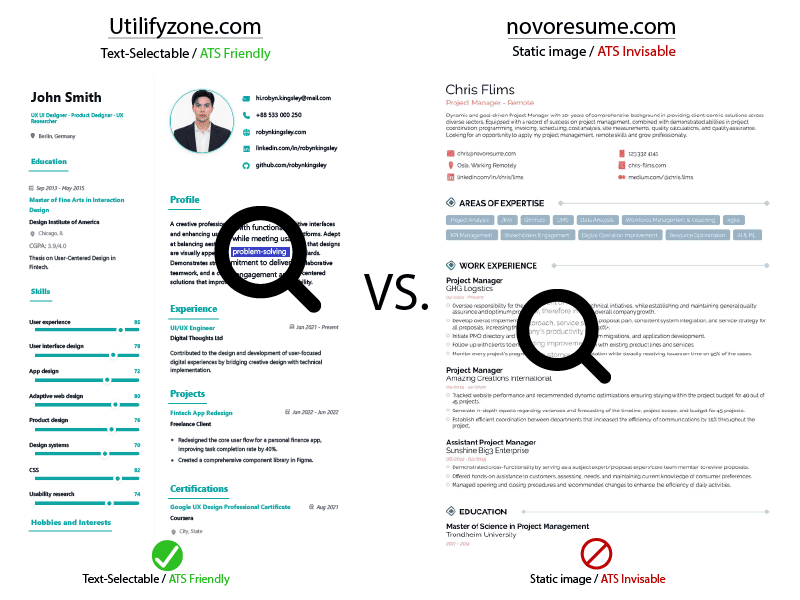
Why text-selectable PDFs pass Applicant Tracking Systems (ATS) while standard image-based exports are invisible to recruiters.
Here’s a critical distinction most users don’t know—and it’s where insider-level expertise matters. Many resume builders generate PDFs by converting the document into a static image or canvas snapshot. These are known as image-based PDFs. While they may look sharp, they fail in ATS systems because the text cannot be parsed or indexed. In contrast, Utilifyzone produces a text-selectable PDF resume, where every word remains accessible, searchable, and machine-readable. This is achieved through web-to-print CSS rendering, allowing the browser to export structured content directly into PDF format without flattening it into an image. The result is a high-resolution PDF export that maintains both clarity and functionality. Recruiters can highlight text, ATS systems can extract keywords, and your resume passes the first digital filter. This technical distinction alone can determine whether your application is seen or silently rejected.
Creating ATS-Compliant Metadata for High-Security Jobs
For roles in finance, healthcare, government, and enterprise tech, ATS compliance goes beyond formatting. These systems evaluate metadata signals such as keyword alignment, section labeling, and document structure. Utilifyzone’s architecture supports this by enforcing clean, predictable layouts that align with ATS expectations. Headings like “Experience,” “Education,” and “Skills” are not just visual—they are structurally embedded in the document flow. This ensures proper indexing during parsing. Additionally, because the tool operates as a free ATS resume builder with no email registration, users can iterate and optimize their resumes without friction or data exposure. There is no forced account creation, no stored drafts, and no risk of sensitive career data being logged. This is especially critical for professionals applying to high-security roles, where confidentiality and data control are paramount. You get a resume that is both technically compliant and privately generated—without compromise.
Niche Excellence: Tailoring Resumes for High-CPM Sectors
Not all resumes are created equal. A developer applying in Silicon Valley, an executive targeting a board position in London, and a student applying for remote internships all require different strategies. Utilifyzone is designed to adapt to these needs without locking users into rigid templates or premium tiers. The platform supports dynamic customization, allowing users to tailor layout, content, and styling based on industry expectations. This flexibility is what makes it suitable for high-CPM sectors where precision matters. Because the tool is fast, private, and unrestricted, users can experiment with multiple versions of their resume without penalty. This iterative approach is essential in competitive markets, where small changes in wording or structure can significantly impact response rates. Utilifyzone doesn’t just help you build a resume—it gives you the control to refine it strategically for your target role.
Executive 1-Page Strategy
For senior professionals and C-level candidates, brevity is power. In the US market, especially, a clean, minimalist CV design is often preferred for executive roles. Decision-makers don’t have time to read multi-page documents. They scan for impact, clarity, and leadership signals. Utilifyzone enables this through streamlined layouts that prioritize hierarchy and readability. The ability to control spacing, font size, and section order allows users to craft a focused, high-impact narrative within a single page. Because the tool is a resume builder with no signup for US executive roles, it removes the friction that often slows down busy professionals. There’s no onboarding, no dashboard, no saved profiles—just immediate access to a powerful editor. This aligns perfectly with the expectations of executive users who value speed, discretion, and precision. The result is a document that communicates authority without unnecessary complexity.
Global Reach: Professional CV Maker
In regions like the UK and Europe, CV standards differ from US resumes in both structure and tone. Length, formatting, and even terminology can vary. Utilifyzone accommodates this by offering flexible editing capabilities that allow users to adapt their document to regional expectations. Whether it’s a two-page CV with detailed experience or a concise profile with academic emphasis, the tool supports it without forcing a predefined format. As a professional CV maker with UK standards, it ensures users can create compliant documents without navigating complex systems or subscription models. The absence of account requirements also means faster access for international users who may be applying across multiple regions. This makes Utilifyzone a truly global solution—a professional CV maker, no account needed, designed to meet diverse hiring standards while maintaining consistent quality and performance.
Remote & Student Needs
The rise of remote work and global hiring has changed how resumes are created and submitted. Students and early-career professionals often need quick, accessible tools that don’t require onboarding or payment. Utilifyzone meets this demand with a streamlined, browser-based experience that works across devices. As the best free resume builder for remote work 2026, it allows users to build, edit, and export resumes from anywhere—without installation or login. This is especially valuable for students who may be applying from shared devices or limited networks. The tool’s speed and simplicity make it ideal as a free resume tool with no signup for college students, enabling them to focus on content rather than process. At the same time, the underlying architecture ensures that even entry-level resumes meet professional standards. This balance between accessibility and quality is what makes Utilifyzone effective across experience levels and use cases.
Frequently Asked Questions (FAQs)
Q1: Is there a truly free resume builder with no signup?
Yes—some tools claim to be free, but most introduce friction at the final step. Utilifyzone is built differently. It is a genuine resume builder, no login, free experience where you can create, edit, and download your resume without creating an account or entering personal details. There is no hidden paywall, no locked export feature, and no email verification step interrupting your workflow. Because the platform uses client-side processing, your resume is generated entirely within your browser, eliminating the need for backend systems that typically require user authentication. This makes it not only faster but also more secure. For users in Tier-1 markets where time and privacy are critical, this approach delivers immediate value without compromise, aligning perfectly with modern expectations of frictionless digital tools.
Q2: How can I download my resume as a PDF without a watermark?
Downloading a clean, professional resume without branding or restrictions is one of the biggest pain points users face. Many platforms allow free editing but lock the final export behind a paywall or add watermarks to force upgrades. Utilifyzone removes this entirely. You can export a no-watermark PDF download instantly, with full formatting integrity and no hidden conditions. The system uses browser-native rendering to generate a high-quality, text-selectable PDF that is ready for submission or printing. There is no degradation in quality, no forced branding, and no subscription required. This ensures that your resume reflects your professionalism—not the platform’s limitations. For job seekers applying at scale, especially in competitive markets, this level of unrestricted access is not just convenient—it’s essential.
Q3: Is it safe to use an anonymous resume builder?
Safety depends on architecture, not marketing claims. Utilifyzone operates as an anonymous career documents platform by design, not by promise. Because all processing happens client-side, your data never leaves your device. There is no server-side storage, no database logging, and no risk of unauthorized access through backend vulnerabilities. This is fundamentally different from traditional resume builders that store user data for account management or analytics. Even temporary drafts are handled locally through browser storage, giving users complete control over their information. This approach aligns with modern data privacy standards and is especially important for professionals handling sensitive career transitions. When you use Utilifyzone, you are not trusting a system to protect your data—you are using a system that never collects it in the first place.
Q4: Will this resume pass an ATS?
Yes, and this is where technical implementation matters. Utilifyzone is designed as an ATS resume maker with no signup, focusing on generating text-selectable PDFs that can be parsed by Applicant Tracking Systems. Unlike tools that export resumes as flattened images, our platform preserves the underlying text structure using web-to-print rendering. This ensures that keywords, headings, and content are readable by ATS algorithms. Additionally, the layout follows standard conventions used in enterprise hiring systems, improving compatibility across industries. The absence of unnecessary design elements and the emphasis on clean semantic structure further enhance parsing accuracy. For users applying to roles in the US, UK, and other high-competition markets, this ensures that your resume is not just visually appealing but technically optimized to pass the first stage of digital screening.
Dive Deeper: The Utilifyzone “No-Friction” Ecosystem
The modern job search demands three things: speed, privacy, and absolute control. Yet, most platforms still cling to outdated models—forcing you through exhausting signups, deceptive paywalls, and aggressive data collection funnels. Utilifyzone represents a fundamental shift toward a zero-signup digital toolkit where your experience is prioritized over monetization.
By stripping away every unnecessary step, we’ve enabled a quick resume builder, a no-account workflow that truly matches the pace of the 2026 job market. There is no waiting for verification emails, no hidden “unlock” fees, and zero compromise on document quality. You receive a professional, ATS-ready document in seconds, not hours. This is exactly what a simple resume maker should be—fast, private, and built with developer-grade precision. If you value your time and your data, this isn’t just an alternative; it is the new standard. Bookmark this page, use it, and move your career forward without friction.
Ready to explore? Your next frictionless task is one click away:
- Secure Your Digital Identity: Don’t just guess your security strength. Use our Password Generator and Strength Checker to create uncrackable keys using secure, browser-based logic.
- Bridge the Gap Between Physical and Digital: Instantly connect with your audience by generating Real-time QR Codes for your portfolio, business cards, or resumes.
- Design for Everyone: Build inclusive digital experiences by creating Accessible Color Palettes that ensure your design systems meet modern compliance standards.
Your workflow deserves to be this easy. Join the thousands of users who have traded account-fatigue for instant results. Explore the rest of the toolkit and see how fast you can really go.</strong
