 Utilify Zone
Free HTML Table Generator Build Responsive Tables Instantly
The Ultimate Free HTML Table Generator: Build, Style, and Export Clean Code Instantly
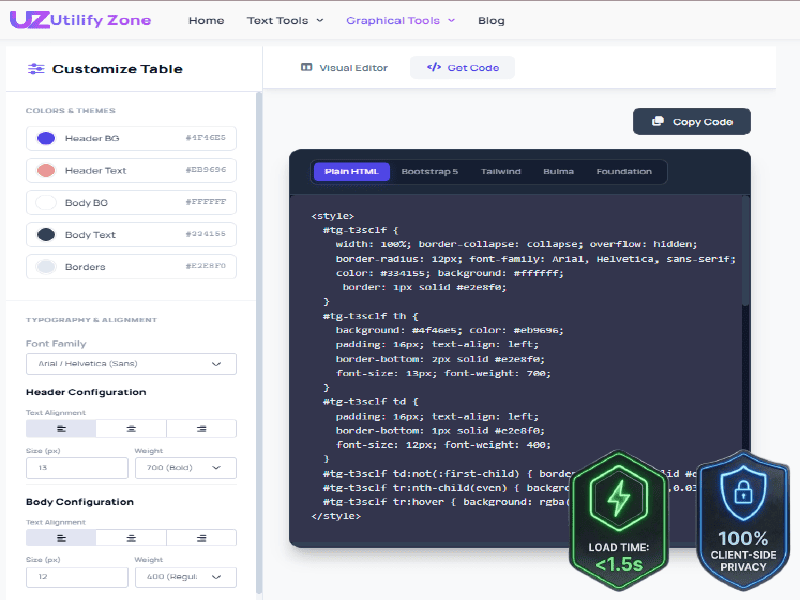
Creating professional HTML tables shouldn’t require hours of manual coding, endless CSS tweaks, or searching through documentation. Whether you’re building comparison tables, pricing charts, product specifications, financial reports, or structured data layouts, a reliable HTML table generator can dramatically speed up your workflow while producing cleaner results.
Our Free HTML Table Generator helps developers, designers, marketers, bloggers, and business owners create responsive, production-ready tables directly in the browser. Instead of manually writing repetitive markup, you can visually build your table, customize its appearance, and instantly generate clean HTML code that works across modern websites and content management systems.
For teams that regularly publish product comparisons, pricing information, technical specifications, or business reports, an efficient HTML table code generator can save countless hours while ensuring consistency across every project.
Why choose this HTML Table Builder?
-
Instant Visual Editing: Real-time preview eliminates manual CSS and HTML troubleshooting.
-
Multi-Framework Output: Generates production-ready code for Bootstrap, Tailwind, and raw HTML.
-
Semantic Structure: Produces accessible, SEO-friendly tags that search engines easily read.
-
Frictionless Access: Unlimited usage with zero login requirements or saved user data.
How to Get Your Free HTML Table Code in 3 Simple Steps
Building a responsive HTML table is surprisingly simple when you have the right tools. Instead of manually creating rows, columns, styling rules, and responsive behaviors, you can complete the entire process in just a few steps.
1. Set Up Your Rows and Columns
Start by defining the structure of your table. Add as many rows and columns as needed for your content, whether you’re creating a simple comparison chart or a large data table containing dozens of entries.
The visual editor eliminates the need to manually write <table>, <tr>, <th>, and <td> tags. Simply enter your content directly into the editor and watch the table update in real time. Need additional columns? Add them instantly. Want to remove unnecessary rows? A few clicks handle the task without touching a single line of code.
This approach is especially useful for users who regularly convert spreadsheet-style data into web-ready tables. Instead of spending time troubleshooting formatting issues, you can focus entirely on organizing your information.
2. Customize Using the CSS Table Generator Controls
Once your data structure is complete, you can customize the visual appearance of your table using intuitive styling controls.
Adjust header colors, background shades, typography, alignment, borders, spacing, padding, and overall presentation to match your website’s design system. Whether you’re creating a modern SaaS pricing table, a technical specification sheet, or a clean business report, the customization options help maintain visual consistency throughout your project.
Unlike traditional coding workflows where every visual adjustment requires CSS modifications, the changes appear immediately within the live preview. This real-time feedback significantly reduces development time and helps you achieve the exact design you’re aiming for.
The built-in CSS table generator functionality translates your visual choices into properly formatted code, eliminating repetitive styling work and reducing the chance of manual coding errors.
3. Export Your Framework-Ready Code
After finalizing your table design, generating code takes only a moment.
Switch from the visual editor to the code output view and copy the generated markup instantly. The generated code is clean, readable, and structured for real-world deployment.
Whether you’re working on a personal website, business portal, eCommerce store, landing page, blog article, documentation site, or web application, the exported code can be integrated directly into your project with minimal adjustments.
This streamlined workflow transforms what would normally be a repetitive coding task into a fast and efficient process, helping teams publish content and launch projects more quickly.
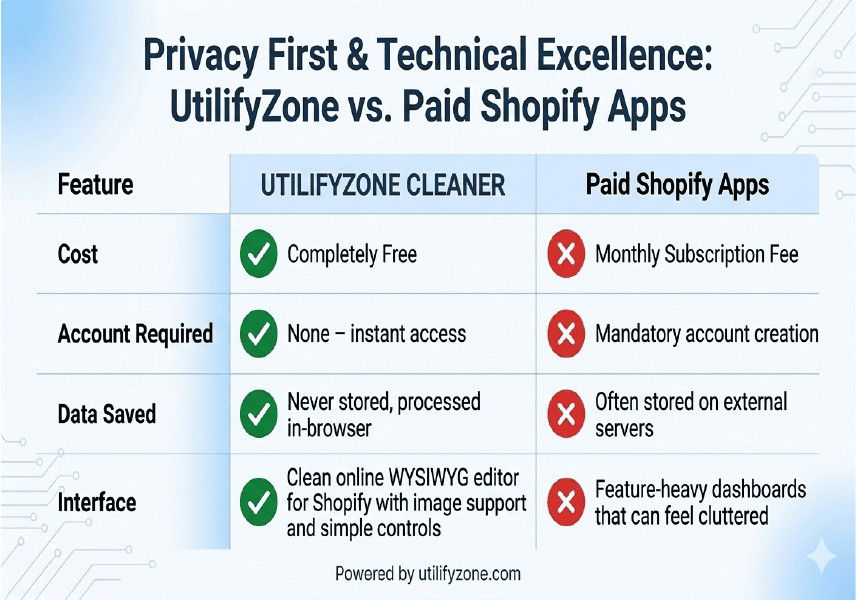
Quick Comparison: UtilifyZone vs Common Competitors
| Feature | UtilifyZone | Common Competitors |
| Registration Required | None | Often mandatory |
| Load Speed | Under 1.5 seconds | Often slower due to heavy scripts |
| Data Storage | None (Client-side privacy) | Frequently stored on servers |
| Code Quality | Clean, semantic HTML | Bloated or messy markup |
This comparison shows why many developers prefer tools designed with speed, privacy, and clean output in mind. By removing login barriers and focusing on efficient code generation, UtilifyZone provides a faster and more secure way to create HTML tables.
Powerful Features of Our HTML Table Code Generator
Creating a table is easy. Creating a table that is clean, responsive, visually consistent, and ready for deployment is where most tools fall short. That’s why our HTML Table Code Generator focuses on the features that developers, designers, marketers, and content creators actually need in real-world projects.
Instead of forcing users to manually edit dozens of HTML tags and CSS properties, the tool simplifies the entire workflow through a visual interface while still producing structured, professional code suitable for modern websites.
Multi-Framework Compatibility
Modern websites rely on different frameworks and development environments, each with its own structure and styling requirements. Instead of manually rebuilding tables for every project, our Table Generator helps create clean, framework-ready code that can be integrated quickly into websites, applications, and content platforms.
Whether you’re building a simple table, a responsive Bootstrap component, or a utility-based layout, the generated markup remains organized and easy to implement. This flexibility helps developers, agencies, and businesses save time while maintaining consistent table structures across multiple projects.
Advanced Visual Styling and Typography
A well-designed table does more than organize data—it helps users scan, compare, and understand information more efficiently. According to research on visual hierarchy and content usability from Nielsen Norman Group elements such as typography, spacing, alignment, colors, and borders play an important role in improving readability and user experience.
With visual customization controls, you can adjust your table’s appearance in real time and preview changes instantly before exporting the code. This approach aligns with accessibility and table design best practices outlined by the W3C and Google’s Material Design guidelines for data tables helping you create professional comparison tables, pricing charts, and structured data layouts more efficiently.
Built for Responsive Web Design
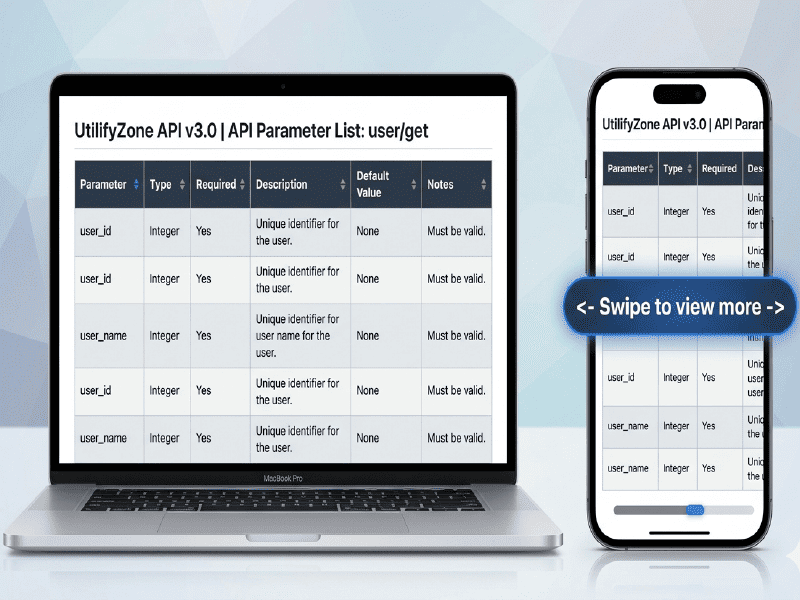
A table that looks perfect on a desktop screen can quickly become difficult to read on a smartphone. With mobile devices now generating the majority of global website traffic according to StatCounter building responsive layouts is no longer optional. Responsive tables help ensure that pricing comparisons, product specifications, and technical data remain accessible across different screen sizes without sacrificing usability.
Our Responsive HTML Table Generator helps create clean, semantic table markup that adapts more effectively to desktops, tablets, and mobile devices. This approach aligns with responsive design best practices recommended by Google’s Search Central documentation and the W3C Responsive Web Design guidelines. By combining structured HTML tables with modern frameworks such as Bootstrap and Tailwind CSS developers can deliver a more consistent user experience while maintaining readability across all devices.
Clean Semantic HTML Structure
Search engines, browsers, and assistive technologies all benefit from properly structured HTML. According to MDN Web Docs, semantic HTML provides built-in accessibility benefits and helps technologies better understand page structure. Likewise, the W3C Web Accessibility Initiative explains that properly marked table headers and data cells help assistive technologies interpret tabular information correctly.
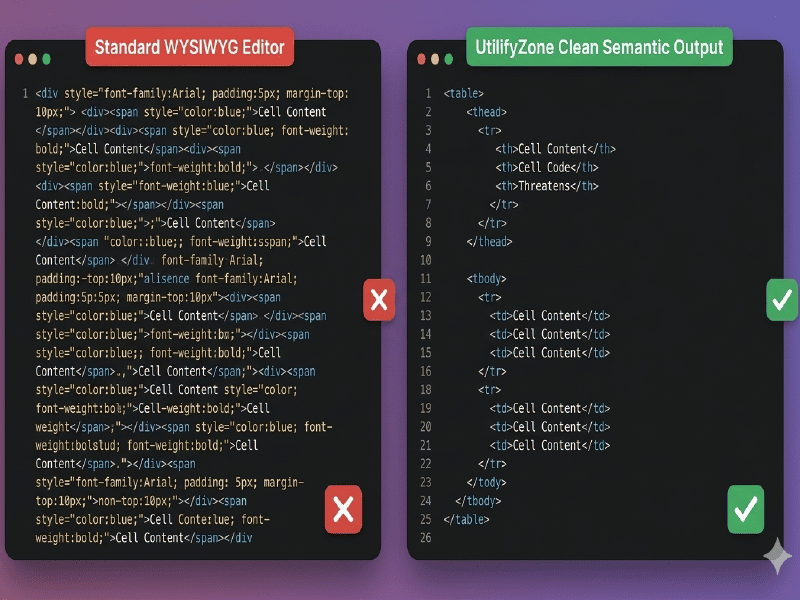
Rather than generating bloated markup, this tool focuses on creating clean table structures that follow standard HTML practices. Well-structured tables are easier to maintain, improve accessibility, and provide better context for users and technologies that rely on semantic markup. As noted in the MDN Table Accessibility Guide, logical table structure with headers, captions, and grouped sections helps create more understandable and accessible data tables for everyone.
Who Can Benefit from a Responsive HTML Table Generator?
Tables remain one of the most effective ways to present structured information because they help users compare values, identify patterns, and locate specific data quickly. According to the
University of Virginia Design System,
tables make complex content easier to understand and allow users to compare information row by row or column by column. Research published by
Cambridge University Press
also notes that well-designed tables help readers find exact values, discover patterns, and interpret detailed information more efficiently.
A responsive HTML table generator helps streamline this process by allowing developers, marketers, educators, and business teams to create structured tables faster without manually writing every row and column. Whether you’re publishing pricing comparisons, product specifications, research data, or technical documentation, organized table layouts improve readability and make information easier for visitors to consume across different devices and screen sizes.
Web Developers and UI Designers
For developers, building tables manually often involves repetitive HTML markup, styling adjustments, responsiveness testing, and ongoing maintenance. Research published in the Journal of Systems and Software found that technical debt and repetitive development activities can reduce developer productivity and increase maintenance overhead. Tools that automate repetitive coding tasks help teams spend less time on routine implementation and more time delivering core functionality.
Visual table builders help streamline this workflow by allowing developers, UI designers, and content teams to prototype layouts, adjust styling, and generate clean code more efficiently. Research from the University of Zurich’s Developer Productivity Project shows that workflow interruptions and excessive context switching can negatively impact developer efficiency and focus. By simplifying table creation and visual customization, teams can reduce unnecessary friction in their workflow while accelerating project delivery.
Content Managers, Bloggers, and SEO Professionals
Structured content helps visitors find information faster and understand it more easily. According to the Nielsen Norman Group, users typically scan web pages rather than read every word, making clear layouts and organized content essential for usability. Comparison tables, pricing grids, feature breakdowns, and specification charts help present complex information in a format that is easier to scan and compare.
For content managers and SEO professionals, manually building tables can be time-consuming. A responsive HTML table generator simplifies the process by helping users create structured layouts more efficiently. The University of Virginia Design System notes that tables are particularly effective when users need to compare values, identify patterns, and locate specific information quickly. Well-structured tables improve readability and create a better overall user experience across different types of content.
eCommerce Businesses and Product Teams
Online stores frequently rely on tables to communicate product specifications, pricing plans, subscription features, shipping information, and technical comparisons. Customers often make purchasing decisions based on the information presented in these tables.
A responsive HTML table generator allows eCommerce teams to create organized product comparison charts that remain readable across desktop and mobile devices. Instead of overwhelming visitors with large blocks of text, businesses can present key information in a format that supports faster decision-making.
Email Marketers and Communication Teams
HTML tables continue to play a critical role in email design. Many email clients still rely heavily on table-based layouts to ensure consistent rendering across devices and platforms.
Marketing teams frequently use tables to organize promotional content, product information, event schedules, pricing details, and campaign data. Creating these layouts manually can be time-consuming and prone to formatting errors.
Students, Educators, and Technical Writers
Educational websites, research portals, online courses, and technical documentation often contain large amounts of structured information. Tables help organize data, definitions, schedules, formulas, specifications, and comparisons in a way that is easier for readers to understand.
Students learning web development can also benefit from seeing properly structured HTML table code generated automatically. Examining clean markup provides valuable insight into semantic HTML practices and modern frontend development standards.
For technical writers and documentation teams, consistent table formatting improves readability and creates a more professional user experience across knowledge bases, manuals, guides, and support documentation.
HTML Tables vs CSS Grid vs Div Layouts: Which Should You Use?
Modern web development offers multiple ways to structure content, but choosing the right approach depends entirely on the type of information you’re displaying. While CSS Grid, Flexbox, and traditional <div> layouts are excellent for page design, they are not always the best solution for presenting structured data.
Many developers mistakenly use layout systems for information that should be displayed in semantic tables. This often creates accessibility issues, complicates maintenance, and makes the code harder to understand. Knowing when to use HTML tables versus alternative layout methods can significantly improve both user experience and code quality.
When working with pricing comparisons, financial reports, product specifications, schedules, inventories, analytics dashboards, or statistical information, semantic tables remain the preferred solution.
Why Semantic HTML Tables Still Matter
HTML tables were specifically designed to display tabular data. Unlike generic containers, table elements provide meaningful relationships between rows, columns, headers, and data cells.
Search engines, screen readers, browsers, and assistive technologies all understand the purpose of properly structured table markup. This improves accessibility while making content easier to interpret across different devices and platforms.
A well-structured table typically includes elements such as table headers, body sections, rows, and data cells that clearly communicate relationships between information. This level of semantic organization cannot always be replicated effectively using generic div containers.
For example, a pricing comparison featuring multiple subscription plans is naturally tabular information. Using semantic tables makes the structure easier to maintain, improves readability, and creates a better experience for users consuming the content.
CSS Grid: Excellent for Layouts, Not Always for Data
CSS Grid is one of the most powerful layout technologies available to modern developers. It excels at creating complex page structures, dashboard layouts, landing pages, and responsive user interfaces.
However, CSS Grid was designed primarily for visual layouts rather than tabular relationships.
While developers can technically recreate tables using Grid, doing so often introduces unnecessary complexity. The browser no longer recognizes the content as tabular data, which can negatively affect accessibility and reduce semantic clarity.
Grid shines when building:
- Website layouts
- Landing pages
- Application interfaces
- Dashboard structures
- Magazine-style designs
- Responsive content sections
For structured datasets, however, semantic HTML tables remain the cleaner and more appropriate solution.
A responsive HTML table generator helps bridge this gap by producing code that maintains semantic correctness while still supporting modern responsive design practices.
Div-Based Layouts and Their Limitations
Before modern CSS standards matured, many websites relied heavily on nested div elements for nearly everything. While div containers remain essential building blocks of web development, they provide no inherent meaning about the content they contain.
When developers attempt to simulate tables using multiple div elements, the resulting code often becomes larger, harder to maintain, and less accessible.
A simple product specification table may require dozens of extra classes and styling rules when built entirely with div containers. The same information can often be represented more cleanly using semantic table markup.
This is particularly important for teams maintaining large websites, where clean code structures directly impact long-term development efficiency.
For projects involving recurring datasets, inventory systems, comparison charts, feature matrices, reporting dashboards, or documentation portals, semantic tables typically provide the most maintainable solution.
Why a Free HTML Table Generator Beats Manual Coding for Tabular Data
Manually building responsive tables can quickly become repetitive, especially when dealing with multiple projects or large datasets. Developers must create the structure, style headers, configure spacing, test responsiveness, and verify accessibility requirements before deployment.
A dedicated HTML Table Generator automates much of this process while still producing professional-quality output.
Instead of spending valuable time writing repetitive markup, users can focus on organizing their information and customizing presentation. The generated code remains clean, readable, and easier to maintain compared to hand-built solutions created under tight deadlines.
This workflow becomes even more valuable for agencies, freelancers, marketers, technical writers, and business teams who regularly publish structured content.
By combining semantic HTML practices with modern responsive design principles, a professional table generator helps users create tables that look great, function properly, and remain accessible across devices without unnecessary complexity.
Frequently Asked Questions
Everything you need to know about our fast, free, and secure HTML Table Generator.
Yes, the HTML Table Generator on Utilifyzone is 100% free and unlimited. You can generate, style, and export as many tables as you need without encountering any paywalls, hidden fees, or restrictions.
No signup or login details are ever required. We believe in providing instant utility, allowing you to access the tool immediately, build your tables, and copy your clean code without sharing an email address or creating an account.
Absolutely. Utilifyzone is 100% secure with a protected HTTPS connection. To guarantee complete user privacy, we do not save any user data on our servers. All table generation and formatting happen safely, directly inside your browser.
Yes. Beyond standard semantic HTML, our generator allows you to style and export responsive table elements structured specifically for popular modern design frameworks, including Bootstrap and Tailwind CSS, ensuring perfect scaling on mobile devices.
Utilifyzone is highly optimized for performance and speed. The tool is lightweight and completely loads in under 1.5 seconds, providing developers and content creators with an ultra-fast, seamless experience.
Continue Building with Our Qr Code Generator Tools
Real-Time QR Code Generator
Generate QR codes for websites, landing pages, product packaging, business cards, marketing campaigns, and customer engagement initiatives. Ideal for developers and marketers who need fast QR generation without relying on third-party software.
Essential Resources & Documentation
Official HTML & Web Development References
- HTML Table Element Documentation (MDN Web Docs) — Complete reference for the
<table>,<thead>,<tbody>,<tr>,<th>, and<td>elements. - W3C HTML Tables Tutorial — Official guidance on creating accessible and standards-compliant HTML tables.
- Bootstrap Table Documentation — Learn how to build responsive tables using Bootstrap’s built-in table classes and utilities.
- Tailwind CSS Table Documentation — Official examples and utility classes for styling tables with Tailwind CSS.
Pro Tip
Bookmark this page (Ctrl+D) to keep your developer workflow fast and friction-free. All Utilifyzone tools are 100% free and secure with HTTPS and never save your personal data.
