 Utilify Zone
Text Pattern Finder
Patterns
0 ActiveExtract Email Addresses from Text Online – Free, Fast & No Signup
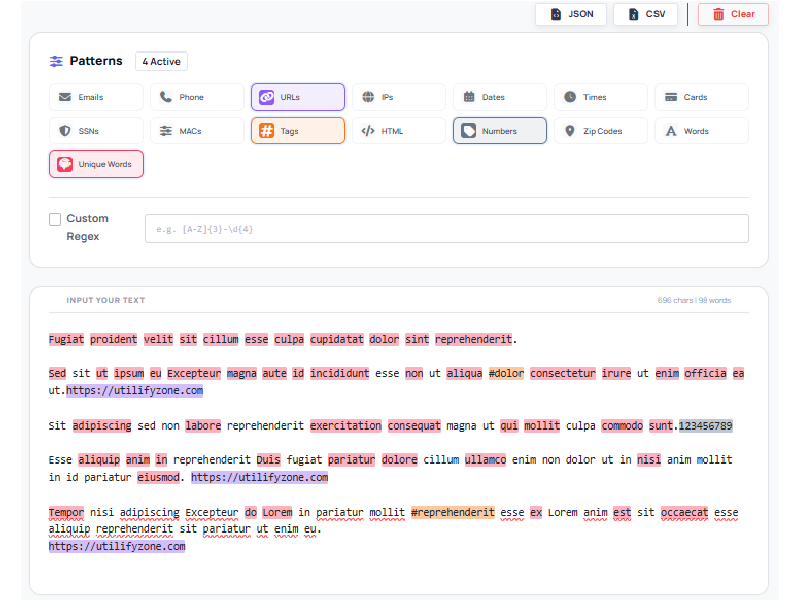
This content explains how to extract email addresses from text online using a fast, browser-based regex pattern finder that processes messy, unstructured data securely, removes duplicates automatically, handles large datasets, and exports clean contact lists — all without signup, file uploads, or privacy risks.
Free Text Pattern Finder: Extract Email Addresses from Text Online Instantly
Turn messy content into clean, usable contacts in seconds with our Text Pattern Finder—a high-performance online email address finder built for elite speed and accuracy. Whether you need to parse raw text data from CRM exports, system logs, or messy inbox content, this tool helps you automate email data extraction instantly.
Designed for professionals who value efficiency, our platform is 100% free with no hidden limits or account creation required. Because the site is engineered to load in under 1.5 seconds and functions entirely with no signup, you save time and protect your data privacy while receiving fast, reliable output every single time. Just paste your text and get immediate results—no delays, no tracking, just pure performance.
Bulk Email Extractor Online: High-Speed Regex Pattern Finder for Every Data Set
Our Bulk email scraper tool is engineered for serious workloads. Built as a high-performance Online regex tester tool, it uses optimized Regular expression email matching to scan and extract data with precision — even from extremely large inputs. The engine is designed to handle over 1 million lines of text smoothly without freezing, crashing, or timing out, making it reliable for developers, analysts, and data engineers working with enterprise-level datasets.
You can extract emails from text directly inside your browser without uploading files or installing software. The parser intelligently scans raw exports, server logs, scraped content, CRM backups, and mixed-format text. It can sort emails from messy data, separate valid addresses from surrounding clutter, and filter alphanumeric strings that don’t meet email format rules — reducing false positives and improving data accuracy.
Unlike basic extract-only tools, this regex-powered engine supports structured grouping, duplicate detection, line-number referencing, and JSON/CSV export. It processes complex inputs containing HTML fragments, tracking parameters, numbers, and embedded symbols — all while maintaining speed and stability.
For professionals in the US and other high-CPC markets where time equals revenue, this tool eliminates manual cleanup and shortens preprocessing time dramatically. It’s built for scale, precision, and reliability — not just casual use, but real production workflows.
Secure Email Scraper No Signup: Private & GDPR Compliant Data Parsing
When you paste sensitive text into an online tool, the first question is simple: Where does my data go?
With UtilifyZone, the answer is clear — nowhere. This tool uses client-side data processing powered by JavaScript, which means everything runs directly inside your browser. Your text is never uploaded to a server, never stored in a database, and never logged in the background. It functions as a true Zero-retention text analyzer — once you refresh or close the page, your data disappears.
For businesses in the US, UK, EU, and other high-compliance regions, privacy is not optional. That’s why the system supports GDPR compliant data parsing by design. Since data never leaves your device, there is no third-party exposure risk and no server-side storage to audit.
If you’re working with CRM exports, scraped lead lists, inbox backups, or internal documentation, you may need to identify PII email patterns safely. This tool allows you to scan and extract structured email data without compromising confidentiality. It’s built to function as a Secure email finder for business leads, giving you speed and extraction power without creating security vulnerabilities.
Many competing tools require file uploads or server processing, which introduces potential risks. UtilifyZone eliminates that concern:
- No signup required
- No account creation
- No file uploads
- No tracking
- No data retention
Your data stays in your browser. Your business leads remain private. And you maintain full control at all times.
How to Extract Emails from LinkedIn Bio and Messy AI Chat Logs?
Modern sales teams spend hours copying contact details from LinkedIn profiles, email threads, and AI-generated conversations. Instead of manually scanning lines one by one, you can extract emails from LinkedIn bio and copy and paste in seconds. Simply paste the raw profile text — including job titles, websites, and social links — and the tool instantly detects valid email addresses while ignoring surrounding clutter.
The same applies when working with ChatGPT or other LLM outputs. AI chat logs often contain repeated messages, quoted replies, formatting artifacts, and conversational filler. You can clean and extract emails from chat logs without reviewing every message manually. The regex engine helps remove AI conversational noise, isolating only structured email patterns from the entire conversation.
This is especially powerful for outbound teams and founders doing social selling. After exporting a conversation history or scraped dataset, you can quickly clean the email list from raw text and prepare it for CRM import, outreach campaigns, or validation tools.
Instead of spending hours filtering through copied text, your sales team gets instant results, cleaner lead lists, and faster campaign execution. It turns messy content into structured contact data — saving time, reducing errors, and improving workflow efficiency.
Extract Crypto Wallet Addresses and Technical Data from Raw HTML Code
For fintech teams, blockchain analysts, and web scraper developers, raw datasets often contain more than just visible content. Important information like wallet addresses and contact emails can be buried inside raw HTML code, JavaScript snippets, or exported page source files. Instead of manually scanning thousands of lines, the Regex Pattern Finder allows you to process and extract structured technical data instantly.
You can extract crypto wallet addresses from bulk text by pasting scraped HTML, blockchain explorer exports, or API response dumps directly into the tool. Whether you’re identifying Bitcoin (BTC) or Ethereum (ETH) address formats inside large datasets, regex-based pattern detection helps isolate wallet structures without being distracted by surrounding markup or attributes.
The same applies when you need to find email addresses in raw HTML code. Many websites embed contact emails inside tags, attributes, or comments. The engine can identify valid email syntax even when mixed with HTML elements, tracking parameters, or encoded characters.
This is especially valuable for:
- Fintech compliance reviews
- Blockchain monitoring workflows
- Scraped dataset cleanup
- Lead intelligence collection
- Smart contract documentation parsing
Instead of relying on fragile scripts or manual inspection, you get fast, browser-based pattern detection that handles technical markup cleanly. It turns complex HTML and blockchain-related data into structured, actionable output — reducing errors, improving extraction accuracy, and accelerating fintech data workflows.
Clean AI-Generated Text Patterns and Messy Chatbot Outputs Automatically
In 2026, one of the biggest data challenges is cleaning AI-generated messy data patterns. ChatGPT, Claude, Gemini, and other LLM tools produce long conversational outputs filled with repeated phrases, bullet points, explanations, disclaimers, and mixed formatting. While the content is useful, extracting structured data from it is time-consuming.
This is where you can clean AI-generated text patterns automatically.
Instead of manually scanning thousands of words, you simply paste the entire AI output into the tool. The Regex Pattern Finder instantly scans the content, detects structured elements like emails, URLs, numbers, hashtags, and other patterns, and isolates them from the noise. It helps you sort emails from messy data without being distracted by conversational text, code blocks, or formatting artifacts.
AI-generated outputs often contain:
- Repeated explanations
- Quoted replies
- Markdown symbols
- Embedded links
- Mixed casing and spacing
- Inconsistent structure
The tool intelligently processes this unstructured text formatting and extracts only valid pattern matches using regex-based detection. You can also enable custom regex to define your own structured rules for AI-cleaned datasets.
Compared to competitors that only scan for simple matches or require file uploads, this tool works fully in-browser, supports multiple pattern types at once, highlights results live, and shows line numbers for precision. It is built for handling messy, real-world AI outputs — not just clean textbook samples.
If your workflow includes exporting AI conversations, scraping chatbot transcripts, or processing LLM-generated research notes, this tool helps you remove AI conversational noise instantly and convert chaotic text into structured, usable data.
That means less manual cleanup, faster CRM imports, cleaner outreach lists, and more efficient automation pipelines.
| Capabilities | UtilifyZone.com | Paid Competitors |
|---|---|---|
| User Account | Not Required | Signup Required |
| Data Processing | Local Browser (Private) | Server-Side (Public) |
| Processing Speed | Under 1.5 Seconds | Network Dependent |
| Daily Limits | Unlimited Use | Credit Based |
| AI Noise Cleaning | Standard Feature | Manual Only |
| Total Monthly Cost | $0.00 | $49.00+ |
UtilifyZone: High-Performance Secure Utilities.
Faqs Section
How do I extract emails from messy text online for free?
To extract emails from messy text online for free, paste your raw content into a browser-based Online Email Scraper that uses regex pattern matching. The tool scans unstructured text, removes formatting clutter, and automatically detects valid email syntax. It can sort emails from messy data such as chat logs, CRM exports, scraped pages, or copied inbox threads — instantly and without manual cleanup.
Can I scrape email addresses from PDF text online or TXT files?
Yes. First, copy the text from your PDF or open your TXT file, then paste the raw content into the online email extractor. The tool parses plain text and extracts email addresses from bulk content, even if the original file had formatting, line breaks, or embedded symbols. No file upload is required — extraction happens directly in your browser.
What is the best regex pattern to extract emails from text online?
A commonly used regex for email extraction is:
[a-zA-Z0-9._%+-]+@[a-zA-Z0-9.-]+\.[a-zA-Z]{2,}
This regular expression email matching pattern identifies valid email syntax while filtering invalid strings. Advanced online regex tester tools allow you to customize or refine the pattern for stricter validation rules depending on your dataset.
How do I remove duplicates and extract emails online at once?
Use an email scraper that automatically detects unique matches. After scanning the text, the tool separates total matches from unique email addresses, helping you remove duplicates instantly. You can then copy or export a clean email list from raw text in one step, saving hours of manual filtering.
Is there a secure email address harvester with no login?
Yes. A secure email address harvester with no login uses client-side data processing, meaning your text never leaves your browser. There is no account creation, no data storage, and no server logging. This enables the safe extraction of business leads, the cleaning of AI-generated text, and the processing of sensitive datasets, while maintaining privacy and compliance standards.
Conclusion: Start Your B2B Lead Generation Workflow
If your growth depends on clean contact data, speed and accuracy are everything. UtilifyZone is built to be the Fastest email extractor for professionals who don’t want to waste time cleaning messy text manually. Instead of juggling multiple tools, you can use one powerful Online email scraper for sales prospecting that works instantly in your browser.
Paste raw LinkedIn bios, AI chat exports, scraped HTML, CRM backups, or TXT data — and convert unstructured content into a structured lead list within seconds. You can remove duplicates automatically, sort valid emails from noisy text, and export scraped data to CSV for direct upload into your CRM, outreach platform, or marketing automation system.
Unlike many tools that require uploads, subscriptions, or server processing, UtilifyZone works client-side, requires no login, and stays fully private. That makes it a practical Free lead generation software alternative for founders, SDR teams, agencies, fintech analysts, and B2B marketers in high-performance markets like the US, UK, Canada, and Australia.
If you’re serious about building a smarter B2B lead generation workflow, this tool helps you:
- Clean email lists from raw text
- Extract structured contact data instantly
- Reduce manual filtering errors
- Speed up outreach preparation
- Improve CRM import accuracy
Stop wasting hours copying and cleaning data manually.
Start extracting smarter, cleaner leads today.
Bookmark this page now and make it part of your daily B2B lead generation workflow.
