 Utilify Zone
In today’s world, digital content creation is bigger than ever. Brands publish hundreds of images per week, designers export visual assets constantly, and content creators are posting to multiple platforms daily. But while visuals push engagement higher, there is one problem almost everyone still struggles with — image conversion time waste.
Manually converting one image at a time slows down workflow, delays delivery deadlines, and interrupts creative momentum. That is why bulk image conversion tools have now become essential. Instead of converting files individually, batch converters allow you to convert multiple images in a single process, saving large amounts of time and effort.
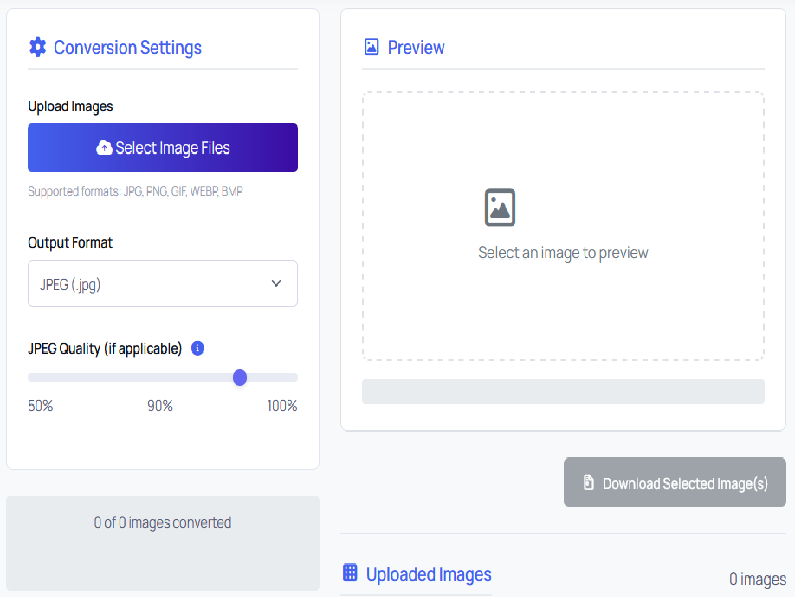
In this article, we will break down what bulk image conversion really means, why it matters today, how creators can benefit from it, plus a comparison of the most common image formats. We will also explore how the free Bulk Image Converter on UtilifyZone.com helps users convert multiple images instantly — directly inside the browser — with no software installs, no account creation, and no privacy risks.
What is Bulk Image Conversion?
Bulk Image Conversion means converting several images together into a different format at the same time instead of converting them individually. This is extremely useful for web developers, photographers, designers, affiliate marketers, social media content creators and agencies who handle large sets of visuals for campaigns, websites, and branding projects.
Instead of repeating the same export step again and again — you convert everything at once.
Why Bulk Image Converters Matter More than Before
The internet now runs visually.
Short-form content, galleries, social media ads, thumbnails, UI design elements, landing page graphics — almost everything uses images.
More content = more images = more operations → resize → compress → convert → optimize.
If single image conversion takes 6 seconds and you have 300 images per week… you waste 30+ minutes doing nothing useful.
That is just conversion
Batch converters eliminate that repeated task instantly.
Time efficiency is now a competitive advantage.
The creators who automate repetitive tasks get ahead faster because they spend more time executing — not preparing assets.
Why UtilifyZone’s Bulk Image Converter is Different
Most converters online force users to upload files to third-party servers. That means risk of data exposure + slow processing.
The tool at UtilifyZone.com works directly inside your browser. All processing happens locally. No upload. No tracking. No storing.
This makes it:
| Feature | UtilifyZone Bulk Converter | Traditional Online Converter |
| Requires account | No | Mostly Yes |
| Upload files to server | No | Yes |
| Privacy risk | Zero | High |
| Processing speed | Instant | Slow depends on server |
| Supported formats | JPG, PNG, WEBP | Varies |
| Limit | No hidden limits | Often limit per day |
Formats You Can Convert Between
Most commonly used formats today are:
| Format | Best Use Case | Benefits |
| JPG | Websites + blogs | Lightweight, fast loading |
| PNG | UI, transparency | Sharp edges, supports alpha |
| WEBP | Modern performance | Smaller size with high quality |
While JPG and PNG are old standards — WEBP is now the fastest growing because Google prefers optimized faster loading visuals.
If you want SEO advantage — WEBP is becoming the best.
When Creators Should Use a Bulk Image Converter
You should batch convert images when you:
- prepare images for blogs and landing pages
- export thumbnails for YouTube channels
- convert assets for mobile apps or UI design
- compress for eCommerce listings
- optimize for WordPress or Shopify speed
- create visuals for ad campaigns
Any time you have multiple images — batch processing saves time.
How UtilifyZone Bulk Image Converter Saves You Hours Every Week
The tool simplifies the entire workflow by removing unnecessary steps:
- Select multiple images at once
- Choose your output format
- Convert instantly
- Download immediately
No installation. No configuration. No complex interface.
This efficiency matters especially for agencies and freelance designers — because time saved becomes profit gained.
Every 5 minutes saved per small task adds up into hours of extra productivity every week.
SEO Benefits of Using Optimized Image Formats
Google ranking factors now include:
- image performance
- page speed
- Core Web Vitals
- media responsiveness
Image optimization contributes directly to this.
By converting images into lighter formats like WEBP — websites load faster → bounce rate improves → ranking potential increases.
That means bulk conversion is not just time-saving…
it is also a ranking strategy.
Example Use Case
Let’s say you are publishing a new tutorial blog with 18 steps and each step has one screenshot.
PNG file sizes might be 700KB each.
If you convert all 18 PNG files into WEBP using UtilifyZone — they drop to around 80KB – 150KB average.
That can take your page load from 12 seconds → down to under 3 seconds.
This directly lowers bounce rate and improves user experience dramatically.
Final Thoughts
Today, the smartest creators are not the ones working harder — they are the ones optimizing processes.
Bulk Image Converter tool turn repetitive, mechanical tasks into one-click operations. This lets you focus more on creative thinking, content quality, marketing strategy, and revenue generation — not manual conversions.
UtilifyZone’s free browser-based batch converter gives you a fast, secure, lightweight solution to convert JPG, PNG, and WEBP images instantly — without signups, without uploading, and without downloading software.
Start empowering your workflow and save hours every week.
Use the free Bulk Image Converter now:
https://utilifyzone.com/bulk-image-converter