 Utilify Zone
Text Editor
Clean HTML Editor for Shopify: Strip Formatting & Fix Product Code
Messy HTML formatting can quietly break your Shopify storefront. When you paste product descriptions from Google Docs, Word, or external websites, hidden tags, inline styles, and inconsistent formatting often sneak into the code. This clutter can disrupt layouts, slow page rendering, and make your product pages harder to maintain. A Clean HTML Editor Shopify merchants can trust helps remove that noise instantly so your storefront stays fast, structured, and professional.
UtilifyZone provides a powerful Clean HTML Editor for Shopify designed specifically for merchants, developers, and ecommerce teams who want precise control over their code. Unlike typical visual editing tools that hide the real structure, this editor lets you clean and refine HTML while still benefiting from a simple Visual Editor workflow. The result is cleaner product descriptions, more consistent formatting, and HTML that behaves exactly as Shopify themes expect.
Most importantly, this tool is completely free, 100% secure, requires no login, and never saves your data. Everything runs directly in your browser over HTTPS, and the page loads in under 1.5 seconds, so you can edit HTML quickly without privacy concerns or performance delays.
Paste your HTML or product description into the editor above and instantly clean, fix, and optimize your Shopify code.
Clean HTML Editor for Shopify: Strip Formatting & Fix Product Code
Pasting content from Google Docs, Word, or other websites into Shopify often creates messy HTML full of hidden tags, inline styles, and broken formatting. That clutter can ruin product page layouts, slow down rendering, and make your storefront harder to maintain. A reliable Clean HTML Editor Shopify merchants can use instantly helps remove unnecessary code, restore clean structure, and keep your product descriptions looking consistent across your store.
UtilifyZone’s Clean HTML Editor for Shopify is built for speed, clarity, and real-world ecommerce workflows. It combines a simple Visual Editor experience with direct HTML control, allowing you to quickly strip unwanted formatting, refine product description code, and prepare clean markup for Shopify themes. Whether you’re fixing imported product content or optimizing HTML for better storefront performance, this tool makes editing fast and frustration-free.
Best of all, it’s completely free, secure, requires no login, and never saves your data. Everything runs directly in your browser over HTTPS and the page loads in under 1.5 seconds, so you can clean and edit HTML without privacy risks or slow tools.
Paste your HTML or product text into the editor above and instantly clean and fix your Shopify code.
Why Your Shopify Store Needs Clean HTML (Performance & SEO)

Visual comparison showing how the UtilifyZone tool strips unnecessary Word formatting to eliminate code bloat.
Many Shopify merchants don’t realize that copy-pasting content from Microsoft Word, Google Docs, or external websites brings a lot of invisible code with it. These editors automatically add extra CSS styles, inline formatting, and hidden HTML tags that are not designed for Shopify themes. When this cluttered code enters your store’s source code, it creates unnecessary complexity that can break layout structures and interfere with the clean HTML5 standards modern Shopify themes rely on.
Over time, this problem creates what developers call “code bloat.” Instead of clean, lightweight markup, your product descriptions become filled with redundant <span> tags, inline CSS styles, and unnecessary formatting instructions. Shopify themes are designed to control styling globally through theme files, but when pasted content includes its own formatting rules, those conflicting CSS styles can override theme settings and damage the consistency of your storefront.
This messy structure also directly impacts Page Speed and Core Web Vitals, two factors that influence both user experience and search engine rankings. When browsers must parse bloated HTML before rendering a page, loading performance suffers. Cleaning your markup and removing unnecessary elements helps Shopify deliver faster pages, better responsive design, and a smoother experience for mobile shoppers.
Here are three common ways messy HTML harms a Shopify store:
- Slower Page Speed: Extra HTML tags and inline CSS increase file size and slow down page rendering.
- Broken Responsive Design: Hidden formatting rules conflict with Shopify themes, causing layout problems on mobile devices.
- Poor SEO Structure: Bloated source code makes it harder for search engines to interpret your page content correctly.
Using a proper editor to remove hidden tags from Shopify text ensures your product descriptions stay clean, lightweight, and fully compatible with modern Shopify theme architecture. Clean HTML keeps your storefront faster, more stable, and easier to manage as your store grows.
How to Remove MS Word and Google Docs Formatting for Shopify
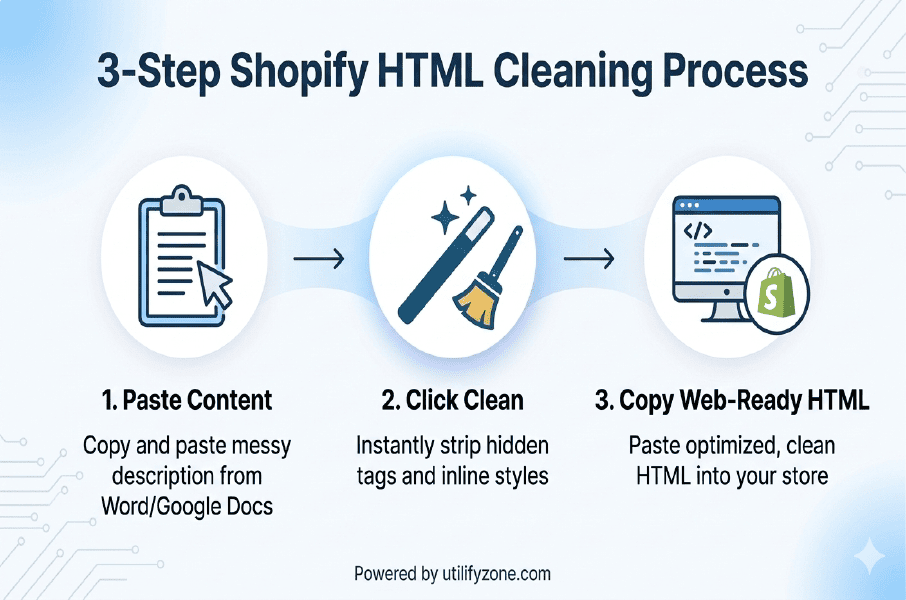
Infographic detailing the streamlined, three-step process to optimize your product descriptions for fast loading.
Copying product descriptions from external editors often adds hidden formatting, unnecessary CSS styles, and extra HTML tags that Shopify doesn’t need. These elements can break layouts and create inconsistent styling across your store. The good news is that fixing this problem is incredibly simple with the UtilifyZone editor.
Follow these three quick steps to clean your content and create Shopify-ready HTML.
Step 1: Paste Your Content into the UtilifyZone Editor
Start by copying the text or HTML from your original source such as Microsoft Word, Google Docs, or another website. Then paste it directly into the UtilifyZone editor above.
This step is perfect if you’re trying to figure out how to paste from Google Docs to Shopify without extra code. The editor immediately displays your content and underlying structure so you can see exactly what formatting came along during the paste process.
Whether you paste from Word or import product descriptions from another platform, the editor prepares the content for quick cleanup.
Step 2: Use the ‘Clean’ Button to Strip Junk Styles
Next, simply click the Clean button in the editor.
This action automatically removes unnecessary elements such as:
- Inline Word formatting styles
- Extra <span> tags and nested formatting
- Unwanted font and color instructions
- Hidden HTML created by document editors
In seconds, the tool performs a Google Docs Fix and helps strip Word formatting for Shopify so your content becomes clean, structured, and compatible with Shopify themes. This process also helps remove Word formatting for Shopify descriptions while keeping the important text and layout intact.
Step 3: Copy the Web-Ready HTML to Your Store
Once the cleaning process is complete, the editor displays lightweight, web-ready HTML. Simply copy the cleaned code and paste it into your Shopify product description, collection page, or custom theme section.
Because the unnecessary formatting has been removed, the HTML integrates smoothly with your Shopify theme. This ensures consistent styling, faster page rendering, and better mobile performance.
Using this simple process allows you to strip Word formatting online, eliminate code clutter, and publish clean Shopify product descriptions in just a few seconds.
RTL Arabic Support: Formatting Product Pages for Middle East Stores
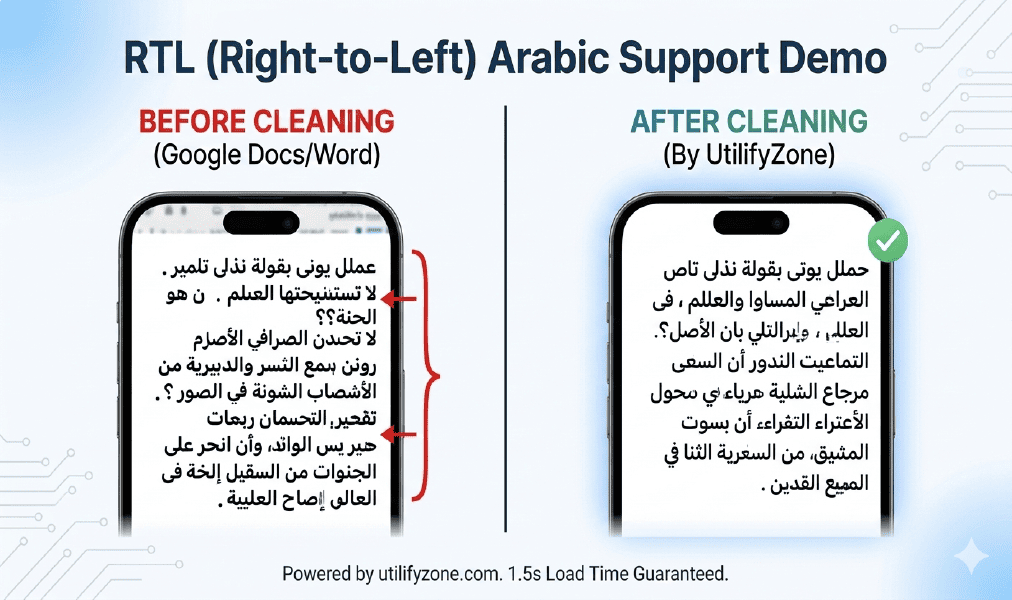
Mobile demo illustrating how our specialized Arabic Text Editor for Shopify restores perfect RTL alignment for Middle Eastern stores.
Many Shopify merchants running stores in the Middle East face a frustrating issue: standard text editors often break Right-to-Left (RTL) formatting. When Arabic product descriptions are pasted from Word, Google Docs, or translation tools, the text direction can flip incorrectly, punctuation appears in the wrong place, and spacing becomes inconsistent. This problem can ruin the visual structure of product pages and make an Arabic storefront look unprofessional. A reliable Shopify Arabic store RTL text alignment tool is essential to ensure your content displays exactly the way Arabic readers expect.
UtilifyZone solves this problem with built-in RTL Support, making it a practical Free online RTL text editor for Shopify Arabic store owners. The editor keeps Arabic text flowing correctly from right to left while cleaning unnecessary formatting at the same time. This means headings, paragraphs, and product descriptions maintain proper alignment when you publish them in Shopify. If you manage multilingual ecommerce content, this Arabic Text Editor for Shopify ensures your storefront remains readable, structured, and visually consistent for Arabic customers across desktop and mobile devices.
Privacy First & Technical Excellence
When you’re editing product descriptions or HTML snippets for your store, data privacy should never be a risk. Many tools and Shopify apps require accounts, store your drafts on external servers, or track your content during editing. UtilifyZone takes a completely different approach. This Shopify description HTML editor with no signup runs entirely inside your browser, meaning your text never leaves your device. It works like a secure notepad for drafting Shopify product copies, allowing you to clean and edit content safely without worrying about your product data being stored, logged, or analyzed.
The editor is also designed with technical safety in mind. During the cleaning process, it helps remove unnecessary formatting and safely strips potentially harmful script tags that sometimes appear when content is copied from external websites or third-party editors. By eliminating risky code and unnecessary formatting, the tool functions as a lightweight HTML editor for fast Shopify stores, helping merchants maintain clean markup that keeps pages secure, stable, and optimized for performance.
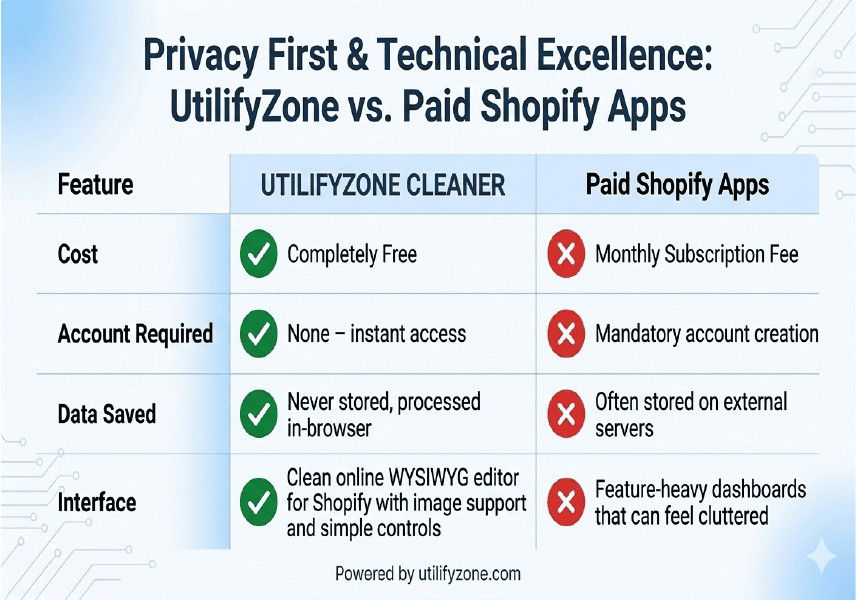
Below is a simple comparison showing how UtilifyZone stands apart from many traditional Shopify editing apps.
| Feature | UtilifyZone Clean HTML Editor | Paid Shopify Apps |
| Cost | Completely Free | Monthly Subscription Fee |
| Account Required | None – instant access | Mandatory account creation |
| Data Saved | Never stored, processed in-browser | Often stored on external servers |
| Load Time | Under 1.5 seconds | Often heavy and slower to load |
| Interface | Clean online WYSIWYG editor for Shopify with image support and simple controls | Feature-heavy dashboards that can feel cluttered |
This privacy-first design ensures merchants, developers, and content teams can edit and clean HTML confidently while maintaining full control over their store data and product content.
Common Shopify Product Description Issues & Fixes
How do I fix broken HTML in Shopify product descriptions?
The fastest way to fix Shopify broken HTML code is to remove unnecessary formatting that comes from Word, Google Docs, or other editors. Use a Formatting Fixer to strip inline CSS, remove hidden tags, and convert rich text into clean, Shopify-friendly HTML. This keeps product pages structured, readable, and compatible with modern Shopify themes.
Can I use this for bulk product uploads?
Yes. Many merchants prepare product descriptions in spreadsheets before importing them into Shopify. This tool works as a clean HTML converter for Shopify bulk uploads, helping you remove Word formatting and messy code before placing descriptions into your CSV file. Clean HTML ensures your Shopify product pages display correctly after import.
Is this editor mobile-friendly?
Yes. UtilifyZone is a mobile-friendly HTML editor for Shopify store owners, allowing you to clean and draft product descriptions from your phone, tablet, or laptop. Because the tool runs directly in your browser, you can quickly edit content, fix formatting issues, and prepare HTML for Shopify even while managing your store on the go.
Master Your Shopify Product Pages with Clean HTML
Clean, well-structured HTML is the foundation of a fast and professional Shopify store. When product descriptions are copied from Google Docs, Microsoft Word, or other editors, they often bring hidden formatting, unnecessary tags, and extra CSS styles. Over time, this code bloat clutters your store’s source code, slows down page speed, and causes layout issues across different devices. Using a reliable Clean HTML Editor for Shopify helps remove that clutter and keeps your product pages consistent, lightweight, and easy to manage.
The UtilifyZone editor works as a powerful Shopify Product Description HTML Cleaner designed specifically for real ecommerce workflows. In just seconds, it can strip inline CSS from Shopify product text, remove hidden formatting, and convert messy rich-text content into clean, structured HTML that works perfectly with Shopify themes. This makes it one of the best HTML cleaners for Shopify product pages when you want faster loading descriptions, better responsive design, and easier long-term store maintenance.
Just as importantly, the tool is built with trust and performance in mind. It is 100% secure, requires no login, and never saves your content. Everything runs directly in your browser over HTTPS, and the page loads in under 1.5 seconds, allowing merchants, developers, and ecommerce teams to clean HTML instantly without risking store data or wasting time on heavy apps.
Don’t let messy code slow down your sales. Start cleaning your Shopify product descriptions for free today!
Related Tools for Shopify Merchants
Running a successful Shopify store often requires more than just editing HTML. Merchants regularly need tools to format product content, update descriptions quickly, protect images, and create assets for packaging or marketing. UtilifyZone provides a collection of lightweight tools designed to make these everyday tasks faster and easier.
Here are a few helpful tools Shopify merchants frequently use alongside the HTML editor:
Text Case Converter
Quickly fix messy product titles by converting ALL CAPS, lowercase, or inconsistent headings into clean, professional title case so your Shopify listings look polished and easy to read.
Find and Replace Text
Instantly update repeated text across descriptions—perfect for bulk editing brand names, pricing terms, or promotional wording in product content before uploading to your store.
Bulk Image Watermark Generator
Protect your Shopify product photos by adding custom watermarks to multiple images at once, helping prevent image theft while maintaining a professional brand look.
Real-time QR Code Generator
Create scannable QR codes for product packaging, inserts, or marketing materials, making it easy for customers to access product pages, manuals, or promotions directly from their phone.
Just like the Clean HTML Editor, every UtilifyZone tool follows the same promise: no login required, 100% secure processing, and lightning-fast performance with load times under 1.5 seconds.