 Utilify Zone
Html Table Generator
Free HTML Table Generator: No Signup | Clean & Fast Code
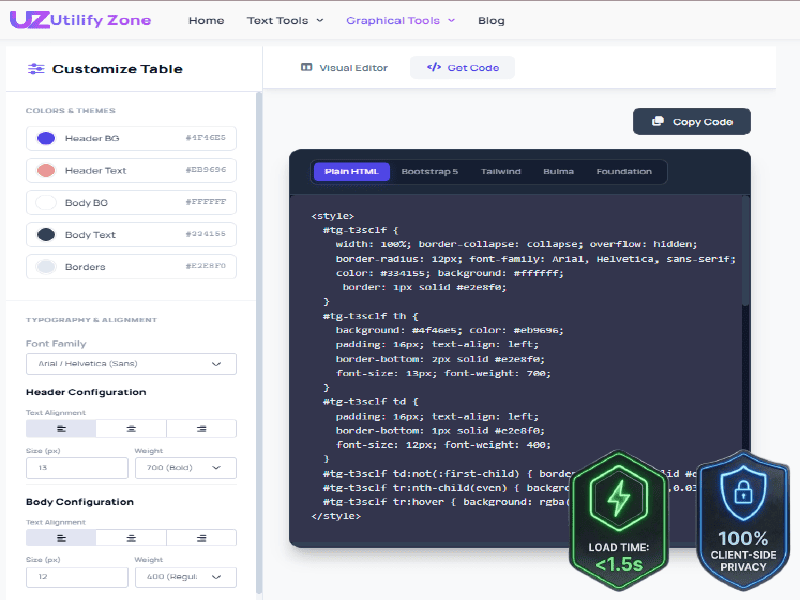
Experience instant, privacy-first table creation. UtilifyZone’s lightweight architecture loads in under 1.5 seconds and processes all data directly in your browser.
Creating HTML tables should be fast, simple, and secure. This Free HTML Table Generator is a Zero-Friction Utility Tool built for developers who hate “account walls.” Instead of dealing with complex editors or outdated generators, you can visually build your table, customize styles, and instantly export optimized HTML code.
The tool focuses on Client-Side Rendering Speed, which means tables are generated instantly inside your browser without sending your data to external servers. This approach allows the editor to behave like a lightweight Single-Page Application (SPA) Speed interface — fast, responsive, and distraction-free. You simply design your table, preview it in real time, and copy the clean HTML structure for use in websites, documentation, dashboards, or Shopify product pages. No signup, no delays, and no unnecessary scripts — just a streamlined developer workflow.
Developer’s Note: Why I Built This
As the CEO of UtilifyZone, I was tired of “div-soup” HTML and tools that quietly collect user data. I built this with a Lightweight PHP backend to ensure zero-latency data processing.
The UtilifyZone Free HTML Table Generator was created to solve that problem. It runs with a Lightweight PHP backend that simply delivers the page and ensures zero-latency data processing, while all table generation happens directly in the browser. This design keeps the tool extremely fast and maintains full privacy — your table data never gets stored, tracked, or logged.
My goal was simple: a privacy-first utility that produces Semantic HTML5 markup instantly. No scripts, no logins, just clean code.
Why Use a No-Signup HTML Table Generator?
Modern developers and website owners value speed, privacy, and clean code. A no-signup HTML table generator removes unnecessary barriers and lets you focus on the real task — creating structured tables quickly. Instead of dealing with registration forms, slow dashboards, or heavy editors, a No-login utility tool like UtilifyZone delivers an instant workflow where you build, preview, and export code in seconds.
The difference is not just convenience. Tools that avoid user accounts often provide better privacy, faster performance, and cleaner code output. Below are the key reasons why many developers prefer no-signup tools when generating HTML tables.
Instant Productivity: Skip the Login Wall
Many online table generators slow users down with account requirements, onboarding screens, or dashboard navigation. This creates friction, especially when you only need a quick HTML table for documentation, landing pages, or product listings.
With a No-login utility tool, the workflow becomes simple:
- Open the tool
- Design your table visually
- Export the HTML instantly
There are no delays, no email verification steps, and no subscription prompts. The tool loads in under 1.5 seconds, allowing developers to maintain focus and productivity without interruptions.
Data Privacy: Why No-Signup Tools are More Secure
When a tool requires login credentials, it often means user data is being stored in a database. That creates potential privacy concerns and unnecessary data exposure.
UtilifyZone avoids this entirely by following a Non-Database Utility Privacy model. The HTML table generator operates with client-side privacy, meaning your table content is processed directly in your browser.
This approach provides important benefits:
- No account creation required
- No data stored on servers
- No table content logged or tracked
- No personal information collected
Your data remains private because the tool works locally in your browser environment.
Clean Code Output vs. Bloated WYSIWYG Editors
Many visual editors generate messy HTML filled with unnecessary wrappers, inline styles, and script dependencies. This is commonly called “code bloat”, and it can slow down websites or make the code harder to maintain.
The UtilifyZone generator focuses on clean, semantic structures and optimized output. Instead of producing cluttered markup, the tool exports minified HTML output that is easy to read, lightweight, and compatible with modern frameworks.
The result is HTML that works smoothly with:
- Static websites
- SaaS dashboards
- Shopify and CMS platforms
- Documentation pages
You get professional-quality code without the complexity of traditional WYSIWYG editors.
Quick Comparison: UtilifyZone vs Common Competitors
| Feature | UtilifyZone | Common Competitors |
| Registration Required | None | Often mandatory |
| Load Speed | Under 1.5 seconds | Often slower due to heavy scripts |
| Data Storage | None (Client-side privacy) | Frequently stored on servers |
| Code Quality | Clean, semantic HTML | Bloated or messy markup |
This comparison shows why many developers prefer tools designed with speed, privacy, and clean output in mind. By removing login barriers and focusing on efficient code generation, UtilifyZone provides a faster and more secure way to create HTML tables.
Core Features of the UtilifyZone HTML Table Builder
The UtilifyZone HTML Table Builder is designed for developers, designers, and store owners who need fast, reliable table generation without unnecessary complexity. Instead of heavy editors that produce messy markup, this tool focuses on clean structure, real-time editing, and performance-friendly code output. Every table you create is optimized for modern websites, mobile devices, and search engine performance.
Because the tool uses a Lightweight PHP Table Generator architecture, the page loads quickly and keeps the interface stable. This helps prevent layout shifts that could negatively affect Core Web Vitals, especially the Cumulative Layout Shift (CLS) metric. The result is a smoother editing experience and tables that render predictably across devices and browsers.
Responsive Table Design for Mobile-First Sites
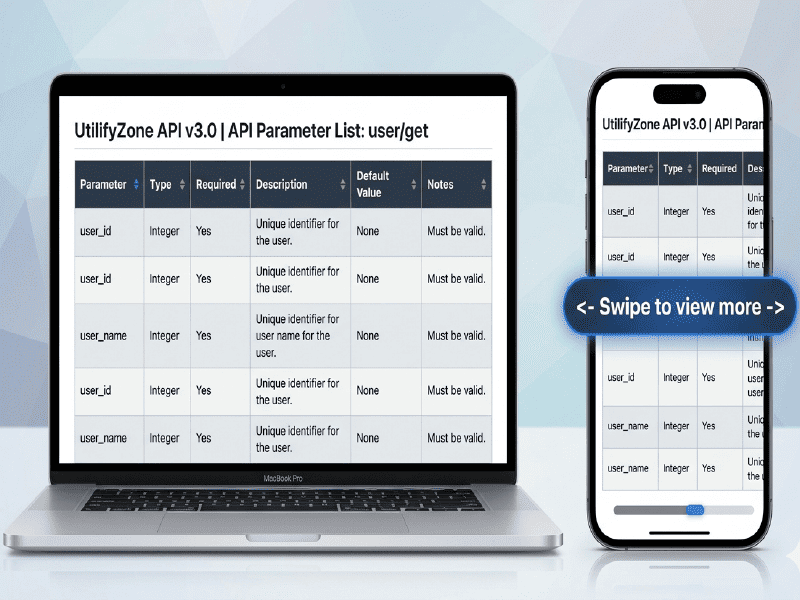
Our Responsive Container ensures your data is readable on any device without breaking your site layout.
Modern websites must perform well on smartphones, tablets, and desktops. The UtilifyZone builder automatically structures tables inside a responsive container, allowing them to scale correctly on smaller screens without breaking the layout.
This approach supports mobile-first responsive design, making the generated tables ideal for:
- product comparison pages
- SaaS dashboards
- pricing tables
- technical documentation
The exported HTML uses proper structural elements such as thead and tbody tags, which help browsers interpret the table correctly. This improves cross-browser compatibility, ensuring your tables display consistently in Chrome, Firefox, Safari, and Edge.
Real-Time Preview and CSS Styling Options
One of the most powerful features of the UtilifyZone table builder is its real-time visual preview. As you adjust settings, the table updates instantly so you can see exactly how it will appear on your final website.
You can customize multiple styling elements directly from the editor, including:
- header and body colors
- border styles
- customizable cell padding
- text alignment and fonts
- row hover and striped styles
These styling controls allow developers to match their existing design system without writing CSS manually. The instant preview reduces trial and error, helping you generate production-ready tables much faster.
One-Click Export: Clean HTML and Inline CSS
After designing your table, the tool allows you to export the code with a single click. The output includes clean HTML structure and optimized CSS, making it easy to integrate into almost any website.
The generator supports both Inline CSS vs. External Styles approaches depending on your workflow. Inline styles are useful for quick deployment inside CMS editors, documentation pages, or Shopify product descriptions, while external styles can be easily extracted if you prefer a centralized stylesheet.
The exported markup remains lightweight and readable, using proper thead and tbody tags along with well-structured HTML elements. This ensures your tables remain easy to maintain, fast to render, and compatible with modern frameworks and responsive layouts.
Essential HTML Table Libraries & Frameworks
Modern web development often relies on frameworks and libraries to speed up design and ensure consistency across projects. When generating tables, it’s important that the code works smoothly with popular CSS frameworks and remains compatible with accessibility standards. The UtilifyZone HTML Table Builder focuses on generating W3C Validated Table Code with Semantic HTML5 markup, making it easy to integrate with modern front-end frameworks while maintaining clean structure and strong SEO performance.
Because the tool prioritizes standards-based output, the generated tables are easier to style, accessible for assistive technologies, and optimized for search engines that evaluate page structure.
Integrating with Bootstrap 5 and Tailwind CSS
Many developers use frameworks like Bootstrap 5 or Tailwind CSS to create consistent user interfaces. Tables generated with UtilifyZone are structured using proper Semantic HTML5 markup, which means they can easily be styled with framework classes without needing to rebuild the table structure.
For example, Bootstrap tables often use classes such as:
- table
- table-striped
- table-hover
Tailwind users can apply utility classes directly to the generated markup to control spacing, typography, and colors. Because the base structure uses W3C validation-friendly HTML, developers can safely integrate the code into existing layouts without breaking their design systems.
This compatibility makes the generator useful for landing pages, SaaS dashboards, comparison tables, and product listings where framework-based styling is common.
Lightweight JavaScript Libraries for Interactive Tables
In some cases, developers need more advanced table features such as sorting, filtering, or pagination. Lightweight JavaScript libraries can extend the generated HTML without rewriting the markup.
Common use cases include:
- sortable data tables for analytics dashboards
- filterable product comparison tables
- paginated data sets for documentation or reporting
Because the UtilifyZone generator produces clean and minimal HTML structure, it integrates smoothly with JavaScript libraries without requiring additional cleanup. The output remains readable and maintainable while supporting interactive functionality.
Generating Semantic HTML5 for Better SEO
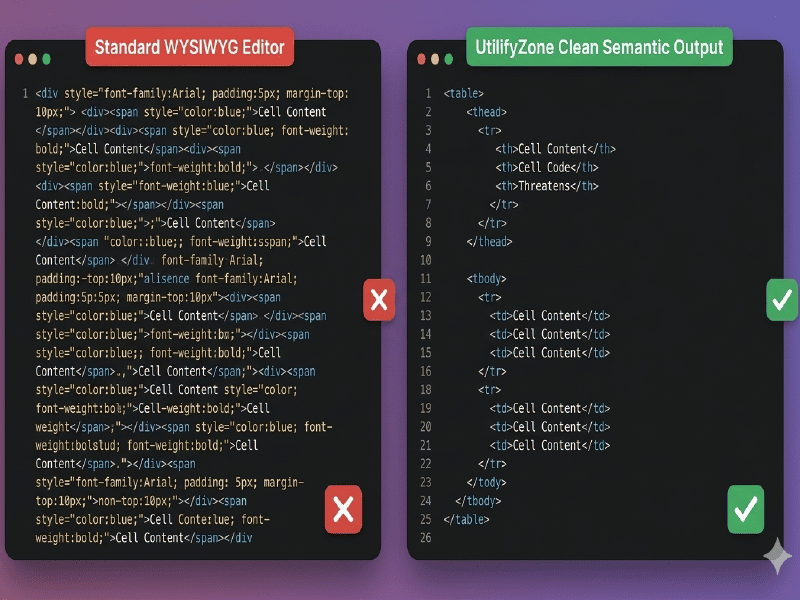
The ultimate E-E-A-T proof. We generate clean, indented semantic HTML5 that search engines love, eliminating messy ‘code bloat’ for faster sites.
Search engines and assistive technologies rely on structured markup to understand page content. That’s why the UtilifyZone generator focuses on producing Semantic HTML5 markup with proper table elements such as:
- <table>
- <thead>
- <tbody>
- <tr>
- <th>
- <td>
Using these elements ensures the table passes W3C validation checks, which improves reliability across browsers and devices. Clean structure also helps crawlers interpret data tables more accurately, improving the SEO value of comparison tables, pricing tables, and informational charts.
Additionally, developers can include ARIA role=”table” accessibility attributes to support screen readers and assistive technologies, making the table accessible to a wider audience.
SEO Tip: Accessibility and Compliance in High-Value Markets
Technical SEO Tip
For websites targeting high-CPM markets such as the United States and the United Kingdom, accessibility compliance is increasingly important. Many organizations must meet WCAG accessibility guidelines, and properly structured tables with ARIA role=”table” accessibility attributes help screen readers interpret tabular data correctly.
Implementing W3C Validated Table Code with semantic HTML elements improves both accessibility and search engine trust. In regulated industries such as finance, healthcare, and government services, following Google’s accessibility standards is not just best practice — it can also be necessary for legal compliance and user accessibility requirements.
Real-World Applications for Fast HTML Tables
Clean HTML tables are more than a formatting element — they are a conversion-focused content structure used across modern websites. From eCommerce product comparisons to SaaS pricing pages and technical documentation, structured tables help users quickly scan information and make decisions. When tables are generated with semantic HTML5 markup and lightweight CSS, they load faster, remain responsive, and improve usability across devices.
The UtilifyZone HTML Table Builder allows developers and merchants to create fast-loading tables without bloated code. Because the generated output is optimized and structured correctly, it works well for commercial pages, content marketing, and technical documentation where clarity and speed are essential.
Creating Product Comparison Tables for Shopify
For Shopify merchants, comparison tables are one of the most effective tools for increasing product conversions. A well-structured table allows shoppers to compare features, specifications, and pricing side by side. This visual clarity reduces confusion and helps customers choose the right product faster.
Many successful stores use a Bento-grid table layout, where products are displayed in organized feature blocks. When these tables are built with clean HTML rather than heavy plugins, they load faster and integrate smoothly with Shopify themes.
Fast-loading comparison tables provide several benefits:
- Better mobile shopping experience
- Faster page speed for product pages
- Clear feature comparison that improves purchase decisions
Because the UtilifyZone tool exports lightweight HTML tables, merchants can quickly insert them into Shopify product descriptions or landing pages, improving both user experience and conversion potential.
Pricing Grids for SaaS and Service Pages
Pricing tables are a critical element for SaaS platforms and service-based websites. A clear pricing grid allows visitors to instantly understand different plans, features, and upgrade options.
Using a fast HTML table builder allows companies to create structured pricing sections without relying on heavy page builder plugins. These tables can be styled with frameworks like Bootstrap or Tailwind while keeping the underlying structure lightweight.
Developers often generate pricing tables from spreadsheets using Excel-to-HTML parsing logic. By converting spreadsheet data into HTML, businesses can quickly update pricing structures and maintain consistency across landing pages.
This approach allows teams to manage pricing data efficiently while maintaining a fast-loading website.
Data Tables for Technical Documentation and Blogs
Technical documentation, developer blogs, and data-driven articles frequently require structured tables to present information clearly. Examples include API parameter lists, feature matrices, and performance benchmarks.
Instead of manually coding tables, developers can import spreadsheet data through CSV delimited data import or simple Excel-to-HTML parsing workflows. This allows large datasets to be converted into structured tables quickly.
Clean HTML tables provide advantages for content-heavy pages:
- Easier readability for complex data
- Faster rendering compared to embedded spreadsheets
- Better SEO indexing for structured information
When documentation pages include well-structured tables, readers can scan information quickly and search engines can better interpret the page content. This improves both user experience and search visibility, making HTML tables a valuable component for technical websites and knowledge bases.
Frequently Asked Questions (FAQ)
How do I make my HTML table responsive?
To make an HTML table responsive, you should place it inside a responsive container that allows horizontal scrolling on smaller screens. This prevents layout breakage on mobile devices. Using a container with overflow-x:auto ensures the table remains readable on smartphones and tablets while preserving the original column structure.
For example, wrapping your table inside a responsive container ensures it adapts to different screen sizes without compressing the data. The UtilifyZone HTML Table Generator automatically produces clean markup that can be easily placed inside responsive layouts used by modern frameworks like Bootstrap or Tailwind.
Is this table generator truly free with no hidden limits?
Yes. The UtilifyZone HTML Table Generator is completely free to use with no hidden limits, subscriptions, or usage restrictions. You do not need to create an account, provide an email address, or install any software.
The tool is designed as a privacy-first developer utility, which means it runs directly in your browser without storing any user data. You can generate as many tables as you want, export the code instantly, and use it in commercial projects, documentation, or eCommerce websites without any paywalls.
Can I import Excel or CSV data without signing up?
Yes. Many developers prepare table data using spreadsheets and then convert it into HTML. With the UtilifyZone generator, you can easily copy spreadsheet content or CSV delimited data and place it into the editor to structure it into a clean HTML table.
This workflow supports common use cases like:
- converting Excel tables into HTML markup
- preparing product comparison tables
- building structured data tables for documentation
Because the tool requires no signup, you can quickly convert spreadsheet-based data into structured HTML without dealing with account systems or file uploads.
Conclusion
Creating clean and responsive HTML tables should not require complicated software or account registrations. The UtilifyZone Free HTML Table Generator was built to provide a fast, simple, and privacy-focused solution for developers, designers, and online merchants who need reliable table code.
Instead of producing bloated markup or storing user data, the tool focuses on speed, security, and clean HTML output. With instant visual editing, responsive table structures, and framework compatibility, you can generate professional tables in seconds and integrate them into websites, SaaS dashboards, documentation pages, or Shopify product comparisons.
By removing login barriers and prioritizing performance, UtilifyZone delivers a practical developer utility that keeps your workflow fast and your code lightweight.
Explore More Free Developer Tools at Utilifyzone
UtilifyZone offers a growing collection of free, privacy-first developer utilities designed to help creators work faster without signup barriers or slow interfaces. Every tool follows the same promise: Free to use, No Signup Required, and under 1.5 seconds load time.
Password Generator and Strength Checker
Create strong passwords instantly with this Secure Credential Creation tool that generates and evaluates password strength in real time while remaining completely free, no-signup, and loading in under 1.5 seconds.
Multi Hash Generator
Quickly generate cryptographic hashes for Data Integrity Verification, allowing developers to convert text into MD5, SHA-1, or SHA-256 hashes using a fast, free tool that requires no login and loads in under 1.5 seconds.
Ultimate Data Converter
Transform data between multiple formats using this Cross-Format Data Transformation utility designed for developers who need a fast, no-signup solution that processes conversions instantly in a lightweight interface.
Text Pattern Finder
Analyze and detect complex text patterns using Regex and String Manipulation capabilities, helping developers search, validate, and process text quickly with a free tool that loads in under 1.5 seconds and never stores user input.
Bulk Image Converter & Watermark Generator
Optimize visual assets with this Visual Asset Optimization tool that converts image formats and adds watermarks quickly, helping protect content while remaining completely free, secure, and no-signup.
PDF to Image Converter
Convert documents instantly using this Document Format Conversion tool that transforms PDF pages into high-quality images without requiring uploads, accounts, or slow processing systems.
Best CSS Gradient & Box Shadow Generator
Design beautiful interface effects with this Modern UI Component Design generator that helps developers create gradients and box-shadow styles visually while exporting clean CSS in seconds.
Real-time QR Code Generator
Generate scannable codes instantly for links, campaigns, or product packaging with this Instant Dynamic Marketing tool that produces QR codes in real time without signup and loads in under 1.5 seconds.
Pro Tip
Bookmark this page (Ctrl+D) to keep your developer workflow fast and friction-free. All Utilifyzone tools are 100% free and secure with HTTPS and never save your personal data.