 Utilify Zone
Html Entity Encoder and Decoder
HTML Entity Encoder and Decoder (No Signup & 100% Private)
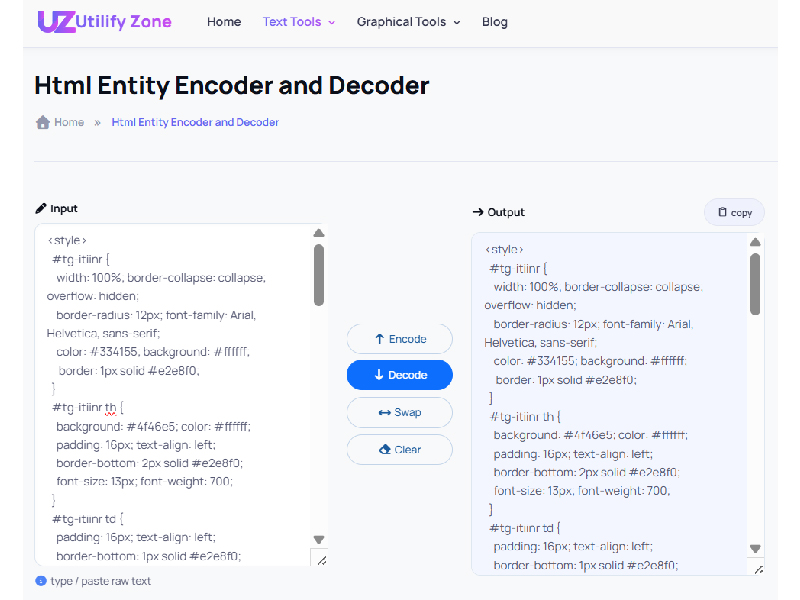
Modern developers deal with raw HTML, CMS editors, documentation platforms, and API responses where special characters can easily break layouts or trigger rendering issues. That’s exactly why the HTML Entity Encoder And Decoder No Signup tool on UtilifyZone was created. Instead of wasting time installing extensions or signing up for developer utilities, you can encode HTML without creating account and get instant results directly in your browser.
This tool converts Reserved Characters such as <, >, &, “, and ‘ into safe HTML entities that browsers interpret correctly during Browser Rendering. Whether you’re debugging markup, preparing code samples for documentation, or preventing rendering conflicts inside WYSIWYG editors, this encoder and decoder provides a fast and reliable workflow.
As someone who has optimized developer workflows and performance-focused tools for years, I know the biggest frustration engineers face today is signup fatigue. Too many tools require accounts, track input data, or limit usage behind paywalls. UtilifyZone solves that problem by providing a Private HTML entity encoder no log system where everything runs client-side. Your data never leaves your browser, nothing is stored on a server, and you can run unlimited conversions safely.
Performance was also a key design priority. The entire interface loads in under 1.5 seconds, making it ideal for developers who value speed and efficiency during debugging sessions or production work. Simply paste your text or code, click Encode or Decode, and instantly transform raw characters into safe HTML entities or convert them back into readable markup.
The Ultimate Guide to HTML Entities: From Basics to Advanced
If you’ve ever written HTML, worked with CMS editors, or embedded code examples inside documentation, you’ve encountered situations where special characters break page structure or render incorrectly. This is where HTML entities become essential. They act as encoded representations of characters that browsers can safely interpret without interfering with page markup.
For example, characters like < and > are interpreted by browsers as HTML tags. If you attempt to display them directly inside content, the browser may attempt to parse them as actual markup instead of text. Encoding them into HTML entities ensures that the browser treats them as visible characters rather than executable structure. This is critical for developers creating tutorials, technical documentation, or blog posts that include raw code snippets.
Using a HTML Entity Encoder And Decoder No Signup tool dramatically simplifies this process. Instead of manually remembering entity codes, developers can instantly convert Reserved Characters into their encoded equivalents. The process also works in reverse—decoding entity strings back into readable characters when analyzing HTML output or debugging CMS content.
Another advantage of modern browser-based tools like the Private HTML entity encoder no log utility on UtilifyZone is privacy and performance. Since everything runs directly in the browser, there is no server processing, no tracking scripts, and no requirement to encode HTML without creating account. This eliminates friction and keeps your workflow fast, secure, and developer-friendly.
Understanding HTML entities also helps improve accessibility, cross-browser consistency, and predictable Browser Rendering behavior across modern web environments. When developers encode characters properly, they prevent layout conflicts, ensure accurate content display, and maintain semantic clarity in their markup. In short, mastering HTML entities is a small skill that delivers a big impact on reliable web development.
What is an HTML Entity? (BASICS)
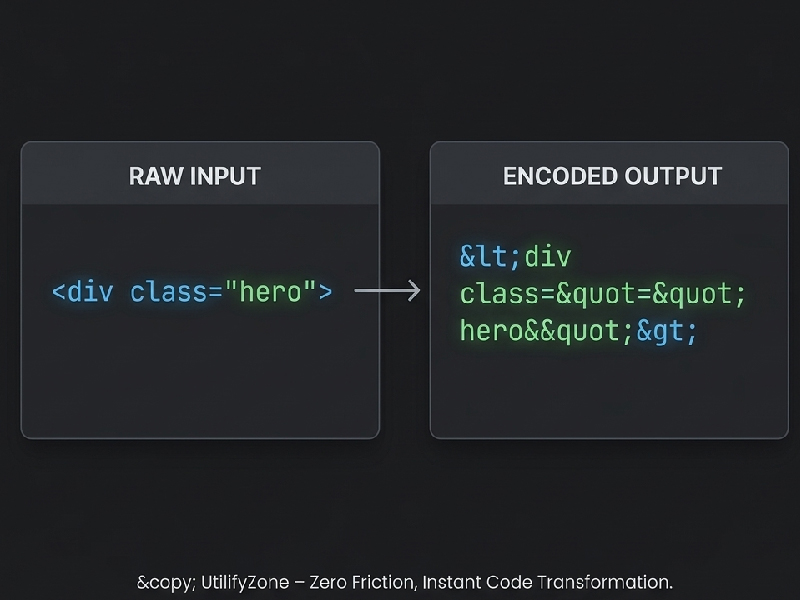
An HTML entity is a special code used to represent Reserved Characters in HTML that would otherwise interfere with Browser Rendering. Instead of displaying raw symbols like < or &, developers encode them as entities (e.g., <, &) based on official W3C specifications. Using a professional HTML Entity Encoder and Decoder allows developers to quickly encode HTML without creating account while keeping proprietary code safe, readable, and 100% private.
How to Encode and Decode HTML in 3 Seconds
Developers often need to convert raw characters into safe HTML entities while debugging markup, preparing documentation, or embedding code snippets into blogs and CMS editors. The UtilifyZone tool is designed to make this process extremely simple and efficient. As the Fastest browser-based entity converter, it eliminates unnecessary complexity and focuses on speed, privacy, and usability. Instead of dealing with Server-Side Overhead or complicated utilities, you can complete the entire process instantly inside your browser using Client-Side Scripting.
Instead of dealing with Server-Side Overhead or complicated utilities, you can complete the entire process instantly inside your browser using Client-Side Scripting. This method ensures that your character mapping follows the industry-standard MDN Web Docs character reference guide, making it a reliable solution for any modern web environment.
Because the tool loads in under 1.5 seconds, the workflow feels almost instant. There are no login forms, no waiting for server responses, and no usage restrictions. That’s why many developers consider it the Best no-login tool for web entities when they need a quick and reliable solution. Whether you are fixing markup issues, displaying raw code safely in tutorials, or decoding entity strings copied from web pages, the steps remain simple and consistent.
Follow these three quick steps to encode or decode HTML safely and efficiently:
-
Paste Your Text or HTML Code
Start by copying the text or HTML snippet that contains Reserved Characters such as <, >, &, “, or ‘. Paste it directly into the input box. The tool is designed to handle plain text, markup snippets, and larger blocks of code used in documentation or CMS editors.
-
Click Encode or Decode
Choose Encode if you want to convert special characters into HTML entities like < or &. Select Decode if you want to transform entity strings back into readable characters. Because the process runs using Client-Side Scripting, the conversion happens instantly without sending your data to a server.
-
Copy the Clean Output
The converted result appears immediately in the output area. Simply copy the encoded or decoded text and paste it into your website, documentation, or development project. This quick workflow is why developers prefer UtilifyZone as a Lightweight alternative to bloated encoders that slow down productivity.
By reducing friction and eliminating unnecessary steps, UtilifyZone helps developers maintain a fast workflow while ensuring accurate and safe Browser Rendering of HTML content.
Why Professionals Choose UtilifyZone (Comparison)
Modern developers and technical writers expect tools that are fast, private, and friction-free. Unfortunately, many online utilities still rely on outdated architectures that process data on remote servers. These platforms often require registration, collect user input, and introduce unnecessary Server-Side Overhead that slows down performance. UtilifyZone was built specifically to eliminate these problems and deliver a faster, privacy-first alternative.
As a seasoned web optimization specialist, I’ve seen how inefficient developer tools can disrupt workflow. Waiting for server processing, navigating login screens, or worrying about whether sensitive data is being logged wastes valuable time. That’s why the UtilifyZone HTML Entity Encoder and Decoder focuses entirely on Client-Side Scripting, ensuring every operation runs directly in your browser.
This approach delivers several major advantages. First, it removes latency caused by server processing. Second, it guarantees privacy because no user input is transmitted or stored. Third, it dramatically improves usability by removing the need for accounts or API keys. The result is a streamlined experience that many developers now consider the Best no-login tool for web entities and the Fastest browser-based entity converter available.
Below is a simple comparison that highlights why UtilifyZone stands out as a Lightweight alternative to bloated encoders used on many traditional platforms:
| Feature | UtilifyZone | Traditional Server-Side Tools |
| Signup Required | No signup required | Often requires account creation |
| Processing Type | Client-Side Scripting (runs in your browser) | Server processing with Server-Side Overhead |
| Load Speed | Under 1.5 seconds | Often slower due to server response time |
| Data Tracking | Zero data storage, fully private | Many tools log or process user input |
By removing registration barriers and focusing on browser-based performance, UtilifyZone offers a developer-friendly environment that respects both productivity and privacy. For professionals working on documentation, CMS platforms, web development projects, or technical blogs, this privacy-first architecture provides a fast and reliable way to encode or decode HTML entities without friction.
Top Developer Libraries for Programmatic Encoding (2026)
Modern development stacks often require automatic HTML entity encoding and decoding inside applications, APIs, or CMS platforms. To solve this, many developers rely on specialized libraries that handle entity conversion safely and consistently across different environments. These libraries are powerful when building large systems, but for quick manual conversions during debugging or documentation work, a Client-side HTML decoder online tool like UtilifyZone is often the fastest option.
Below are some of the most widely used libraries developers rely on in 2026:
JavaScript (he, entities), Python (BeautifulSoup), and PHP
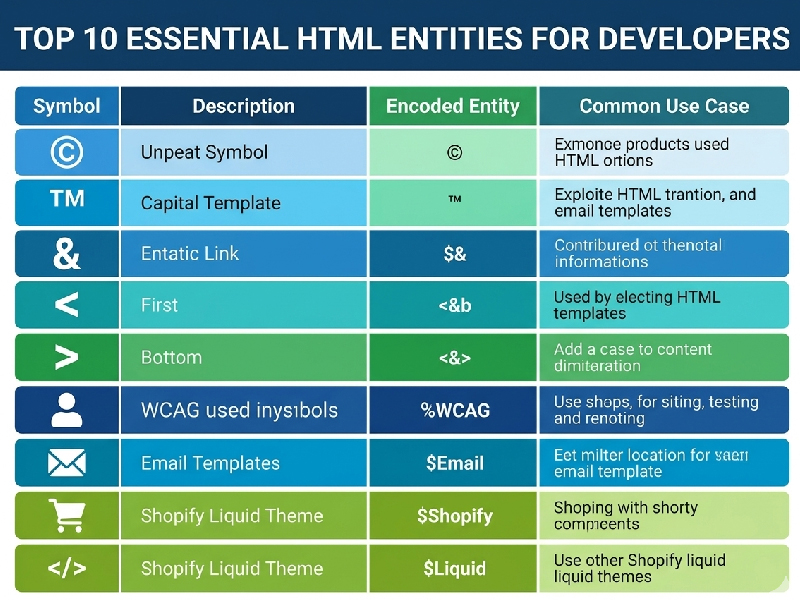
In JavaScript environments, the Javascript he library is widely considered one of the most reliable solutions for encoding and decoding HTML entities. It handles Unicode characters correctly and prevents rendering issues in browsers. Many front-end frameworks integrate this library when processing dynamic user content to ensure a Safe way to decode user input without breaking markup or exposing XSS vulnerabilities.
Python developers frequently use BeautifulSoup when parsing HTML documents or scraping web content. While primarily a parsing library, it includes utilities that automatically convert encoded entities into readable characters when processing page data. This makes it useful when working with HTML-heavy datasets, documentation extraction, or automated testing workflows.
For server environments, PHP includes built-in functions such as htmlspecialchars() and htmlentities(). These functions convert Reserved Characters into safe HTML entities before content is rendered in a browser. They are commonly used in CMS platforms and backend frameworks to prevent markup conflicts and ensure safe rendering of user-generated content.
While these libraries are excellent for automated systems, developers often need a fast manual utility when testing markup, debugging CMS output, or preparing code snippets for blog posts. Installing libraries, writing scripts, and running local environments can slow down simple tasks. This is where UtilifyZone becomes extremely valuable. It acts as a Lightweight alternative to bloated encoders, allowing developers to instantly encode or decode entities in seconds without setup. Instead of configuring a development environment, engineers can simply paste their text and convert it instantly using the Fastest browser-based entity converter available.
100% Private & Secure: Client-Side Browser Processing
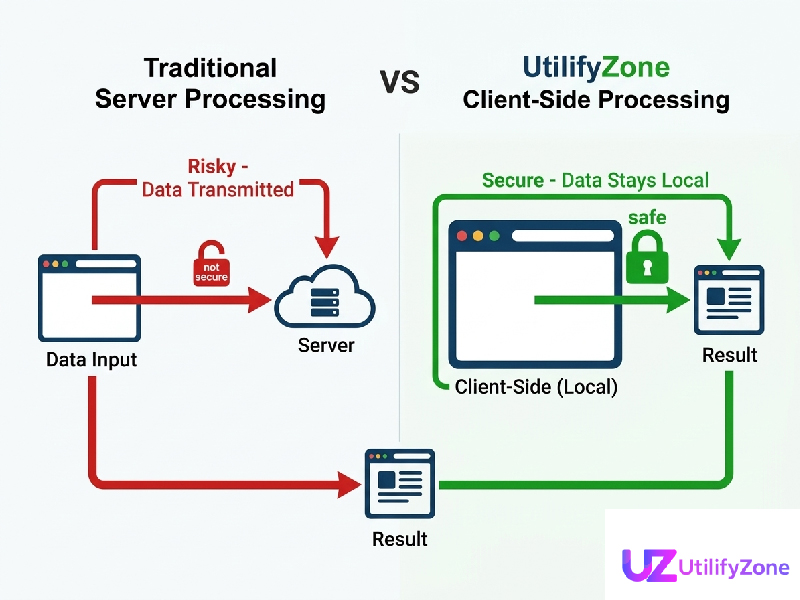
Security and privacy are major concerns for developers working with HTML snippets, templates, or application code. Many online tools process user input on remote servers, which means the data is transmitted across the internet and potentially logged or stored. For developers handling proprietary templates, internal documentation, or sensitive client code, this creates serious Source Code Security risks.
UtilifyZone eliminates these concerns by running the entire encoding and decoding process directly inside the browser using client-side processing architecture. Because the system relies on optimized JavaScript and lightweight processing logic, the conversion occurs locally on the user’s device. This means the tool functions as a Client-side HTML decoder online where your text never leaves your computer.
The security advantage of this architecture is significant. Since no server processing occurs, your raw HTML snippets, encoded entities, or documentation examples are never transmitted to a remote database. The system does not store input, track usage, or log requests. This aligns with modern Data Privacy Standards required by enterprise teams and agencies operating in high-compliance regions such as the United States, United Kingdom, and European Union.
Another important benefit is protection against accidental exposure of sensitive code. Developers often paste internal templates, testing scripts, or CMS components into encoding tools. If those tools rely on server processing, there is always a risk that the content could be logged or cached. UtilifyZone removes that risk entirely by ensuring that every operation happens locally through Client-Side Scripting, making it the Safe way to decode user input while preserving privacy.
Combined with HTTPS encryption and a lightweight architecture that loads in under 1.5 seconds, UtilifyZone provides a fast, secure, and developer-friendly environment. This focus on performance and privacy is why many engineers now consider it the Best no-login tool for web entities, especially when they need a quick and secure way to encode or decode HTML without exposing their source code to external servers.
The content must be according to my tool fully semantic for a top1 tier countries fully user engaging and SEO optimized for google and user friendly and every heading must have 120+ words.
Expert Developer FAQs on HTML Entities
Modern developers frequently encounter encoding problems when working with CMS platforms, APIs, email templates, or user-generated content. Understanding how HTML entities work helps prevent rendering issues, broken characters, and security vulnerabilities. Below are three practical questions developers often ask when dealing with HTML encoding and decoding workflows.
Why is my apostrophe showing as ' or ' instead of a normal character?
This issue usually occurs when content has been encoded to ensure safe Browser Rendering. Many CMS platforms and frameworks automatically encode special characters to prevent markup conflicts or Cross-Site Scripting (XSS) vulnerabilities. In the UTF-8 Character Set, an apostrophe may appear as encoded HTML such as ' or '.
When content is rendered in HTML, the browser converts these entities back into the correct visible characters. However, if the content is displayed inside a code block, database output, or JSON response, the encoded entity may appear literally. Developers often see this when exporting content, debugging APIs, or reviewing HTML source.
To solve this quickly, you can decode the entity back to its readable form using a Private HTML entity encoder no log tool like UtilifyZone. This allows developers to safely decode entities and verify how text will appear on the final webpage without editing templates or running scripts. It’s one of the fastest ways to test character rendering and ensure clean output in the UTF-8 Character Set used by modern browsers.
How do I display raw HTML as plain text in a webpage?
Displaying raw HTML code inside tutorials, documentation pages, or developer blogs requires special handling. If HTML tags are inserted directly into a webpage without encoding, browsers interpret them as real markup instead of showing them as text. This can cause missing code snippets or broken layouts.
To Display raw HTML as plain text, developers convert markup symbols such as <, >, and & into safe HTML entities like <, >, and &. Once encoded, the browser shows the code exactly as written rather than executing it. This technique is essential for programming tutorials, developer documentation, and technical blog posts where code examples must remain visible to readers.
Using a fast HTML Entity Encoder And Decoder No Signup tool simplifies this workflow dramatically. Instead of manually replacing characters or installing libraries, developers can paste the raw code into the encoder and instantly generate safe output. Because UtilifyZone operates entirely in the browser, it allows developers to Encode HTML without creating account, maintaining privacy while ensuring the code remains safe, readable, and correctly formatted for web documentation.
How can I fix broken characters in email templates or CMS content?
Broken characters in email templates are extremely common, especially when text passes through multiple systems such as CRMs, CMS platforms, and email marketing software. Symbols like quotation marks, ampersands, and accented characters can appear incorrectly if the encoding format does not match the UTF-8 Character Set used by modern browsers and email clients.
Developers often notice issues when trying to Fix broken characters in email templates where apostrophes, currency symbols, or special punctuation display incorrectly. This happens because many email platforms sanitize HTML aggressively to prevent security issues, converting characters into HTML entities during processing.
By decoding those entities before final rendering—or encoding them properly before inserting the content—developers can maintain consistent character formatting across Gmail, Outlook, and other email clients. Tools like UtilifyZone help developers instantly convert encoded characters into their correct forms, ensuring the final HTML email displays correctly. Because the conversion runs locally in the browser, developers can safely test snippets without exposing proprietary template code, maintaining Source Code Security while ensuring reliable cross-client rendering.
Conclusion
Modern web development requires tools that are fast, secure, and friction-free. A reliable HTML Entity Encoder And Decoder No Signup eliminates the frustration of signup walls, protects sensitive snippets through client-side processing, and helps developers quickly solve rendering issues. Whether you’re debugging templates, sanitizing user input, or preparing documentation code blocks, a lightweight encoder dramatically improves productivity. UtilifyZone was built for exactly this workflow—instant conversions, Private HTML entity encoder no log, HTTPS security, and sub-1.5-second load speed. Bookmark this tool now so you always have a trusted solution to encode, decode, and debug HTML entities without interruptions.
Explore More Free Developer Tools by UtilifyZone
Developers often need multiple utilities when building modern web interfaces or optimizing content rendering. To maintain a fast and secure workflow, we recommend these related tools:
Accessible HTML Table Generator – Generate clean, WCAG-compliant tables with semantic markup.
Secure HTML Decoder Online – A 100% private way to reverse entities into readable text instantly.
Ultimate Data Converter – Seamlessly transform data formats without server-side logging.
Real-time QR Code Generator – Create secure, fast-loading QR codes for your web projects.