 Utilify Zone
Free Barcode Generator with Custom Text Labels
📑 Jump To Section
- How to Generate Barcodes with Custom Text Labels
- Why Choose a Private Barcode Maker (No Data Storage)
- High-Resolution SVG Barcode for Printing
- Real-World Applications (Amazon FBA, Warehouse, Retail)
- Fix Barcode Scanning Errors (Complete Guide)
- Frequently Asked Questions (FAQs)
- Secure, Fast & Professional Barcode Labeling
- Essential Resources & Related Tools
Barcode Generator with Custom Text Labels Free & No Signup
As developers, we built this tool to eliminate slow, data-logging barcode generators—delivering a fast, privacy-first solution that runs entirely in your browser. With sub-1.5s load speed and zero server processing, it’s one of the most secure and efficient barcode tools available today.
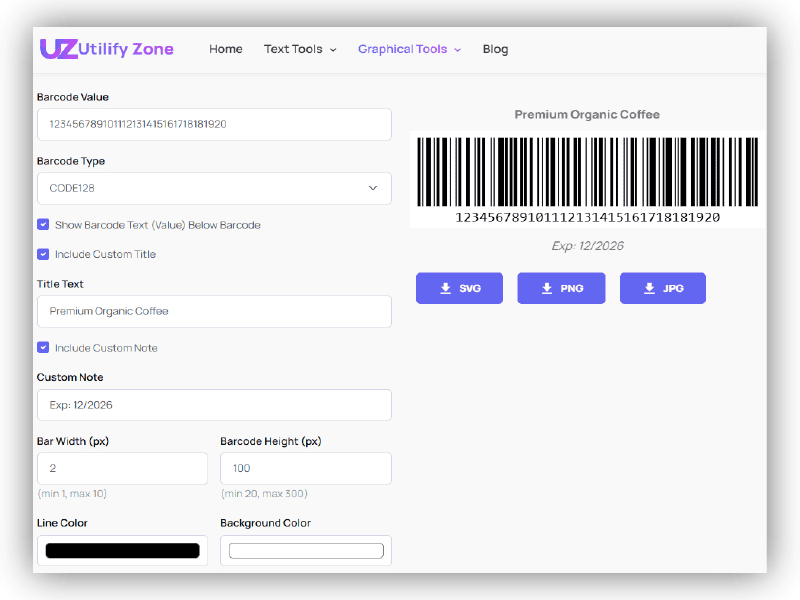
Creating barcodes should be instant, flexible, and completely private. This Barcode Generator with Custom Text Labels is a free barcode generator without signup designed for developers, eCommerce owners, and businesses who need clean, customizable outputs without friction. Unlike traditional tools that rely on server requests and tracking, Utilifyzone operates as a No-login utility and fully browser-based app, meaning your data never leaves your device.
You can generate professional barcodes, add custom titles or notes, adjust dimensions, and export in multiple formats—all in real time. No delays, no restrictions, and no hidden processing. Just a fast, secure workflow built for modern developers who value speed, control, and privacy.
How to Generate Barcodes with Custom Product Labels (Step-by-Step)
Creating professional, scannable barcodes with labels should feel effortless—and with Utilifyzone, it is. This free barcode generator with product name label is designed to give you full control in seconds, without signup or technical complexity. Follow these simple steps to generate high-quality, printable barcodes with custom text.
1. Adding Titles and Descriptive Notes to Your Labels
Start by entering your barcode value (product ID, SKU, or number). Then choose your barcode format such as CODE128 for maximum compatibility.
Next, enable the Custom Header Text option to add a product name, brand label, or identifier above the barcode. This helps with visual organization, especially for inventory or retail use.
You can also include a description note below the barcode. This is ideal for adding batch numbers, pricing notes, or internal references—making your output a printable CODE128 barcode with description note that’s both machine-readable and human-friendly.
The tool automatically aligns your title and note with the barcode, creating a clean and professional label layout without manual formatting.
2. Adjusting Bar Width and Text for Maximum Scannability
Once your content is set, fine-tune the barcode for optimal scanning performance. Use the barcode tool with adjustable bar width to control thickness—thicker bars improve scan reliability, especially for printed labels.
You can also adjust the height and toggle human-readable text (the numeric value below the barcode). This ensures both scanners and humans can interpret the data easily.
Maintaining the correct aspect ratio is critical. A balanced width-to-height ratio prevents distortion and ensures compatibility across scanners used in retail, logistics, and warehousing.
Expert Insight:
For retail and physical product labeling, a minimum barcode height of 0.5 inches is recommended to ensure consistent scanning across POS systems and handheld scanners.
With these adjustments, you can generate clean, scannable, and fully customized barcodes ready for print, packaging, or digital use—without any trial and error.
Why Choose a Private, Client-Side Barcode Maker?
In today’s data-sensitive environment, generating something as simple as a barcode can expose critical business information if the tool is not secure. Many online generators quietly send your inputs to external servers, creating unnecessary risk. Utilifyzone eliminates that risk completely by operating as a private barcode maker with no data storage, built for developers, retailers, and enterprises that prioritize security.
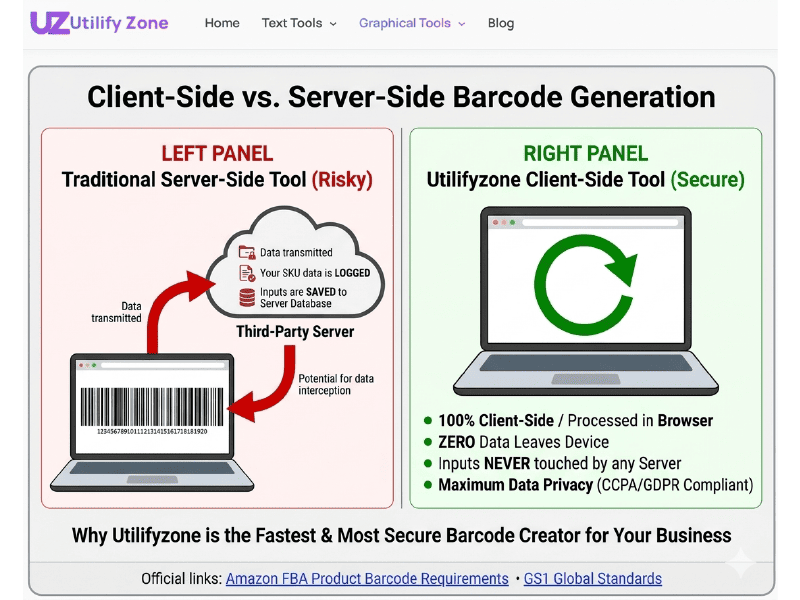
Our architecture is designed around client-side rendering, meaning all processing happens directly in your browser. Our tool uses local JavaScript (Client-Side). Your data never touches our database. This ensures zero data logging, no tracking, and full compliance with modern data privacy policy expectations. Whether you’re generating SKUs, product codes, or internal inventory labels, your information remains fully under your control.
Secure Barcode Maker for Inventory: No Server Logging Explained
For businesses managing inventory, barcode data often includes sensitive product identifiers, pricing structures, or internal tracking codes. Using a secure barcode maker for inventory no signup ensures that none of this information is exposed to third-party servers.
With Utilifyzone, there is:
- No account creation
- No API requests
- No backend storage
Everything is processed instantly within your browser environment. This makes it an ideal browser-side barcode maker with label privacy, especially for corporate teams handling confidential data. You can safely generate, preview, and export barcodes without worrying about leaks, logs, or compliance issues.
Browser-Side Generation vs. Server-Side Security Risks
Traditional barcode tools rely on server-side processing. This means every input—product codes, labels, and notes—is transmitted over the internet and potentially stored, cached, or logged. Even with HTTPS, this introduces risks such as:
- Data interception during transmission
- Unauthorized logging or analytics tracking
- Long-term storage vulnerabilities
In contrast, Utilifyzone uses a client-side rendering model powered by local JavaScript. This removes server-side security risks entirely because no data is transmitted or processed externally.
For developers and organizations focused on data sovereignty and compliance, this approach is critical. A private barcode maker no data storage solution ensures that your workflow remains fast, secure, and fully compliant with modern privacy standards—without sacrificing performance or usability.
Professional Barcode Formats: High-Resolution SVG for Printing
When it comes to professional barcode usage—especially in retail, logistics, and manufacturing—the output format matters just as much as the data itself. Utilifyzone is built to generate high-resolution SVG barcode for print, ensuring your labels remain sharp, scalable, and scanner-friendly across all devices.
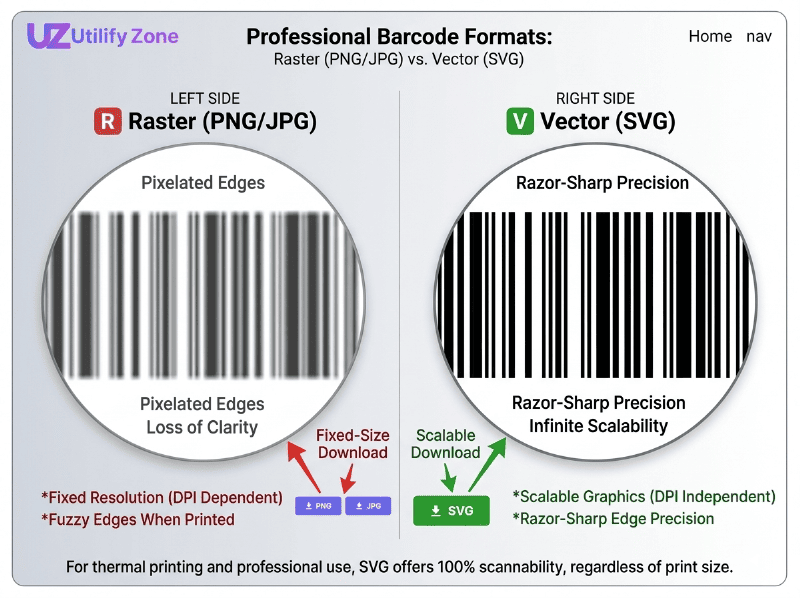
Unlike raster formats like PNG or JPEG, which rely on fixed DPI resolution and can become blurry when resized, SVG uses vector SVG format technology. This means your barcode is rendered as scalable graphics, maintaining perfect clarity at any size—whether it’s a small product label or a large warehouse tag. For developers and operations teams, this eliminates the risk of scan failures caused by pixel distortion or compression artifacts.
Why SVG is the Best Format for Thermal Label Printers
Thermal printers such as those from Dymo and Zebra require clean, high-contrast barcode images to ensure accurate scanning. SVG is the preferred format because it delivers crisp edges and consistent line thickness, regardless of scaling or print size.
With a thermal printer compatible barcode with notes, you can include both machine-readable bars and human-readable labels without sacrificing quality. SVG ensures that:
- Bars remain sharp and precisely aligned
- Text labels stay legible at any size
- Print output is consistent across different devices
This is especially important for high-volume printing environments where even minor distortions can lead to scanning errors. By using SVG, you ensure maximum reliability and professional-grade output every time.
Creating Asset Tracking Barcodes with Company Titles
For enterprise use, barcodes often go beyond simple product identification. Businesses need structured labels that include branding, asset IDs, and descriptive metadata. Utilifyzone enables you to create an asset tracking barcode maker with company title functionality—allowing you to add custom headers and notes directly into your barcode layout.
You can:
- Add a company name or department label as a header
- Include asset descriptions or internal codes as notes
- Maintain a clean, structured layout for easy scanning and identification
Because everything is generated in vector SVG format, your branded barcode labels remain sharp and professional across all print sizes. This makes the tool ideal for inventory systems, warehouse tracking, and enterprise asset management where clarity, consistency, and scalability are critical.
Real-World Applications: From Amazon FBA to Warehouse Logistics
Barcodes are not just technical elements—they are revenue-critical assets in eCommerce, logistics, and retail operations. A fast, reliable automated labeling workflow can directly impact fulfillment speed, inventory accuracy, and customer experience. Utilifyzone’s Barcode Generator with Custom Text Labels is built for high-performance environments where clarity, compliance, and speed are non-negotiable.
Whether you’re preparing shipments for Amazon, organizing warehouse racks, or printing retail packaging labels, this tool enables you to generate professional, compliant, and fully customized barcodes instantly—without delays, subscriptions, or data risks.
FNSKU & UPC-A Generator for Amazon FBA Sellers
Amazon FBA sellers operate in a highly regulated environment where barcode accuracy and compliance directly affect inventory acceptance. Using a FNSKU generator for Amazon FBA free, sellers can quickly create scannable labels that meet Amazon’s strict requirements.
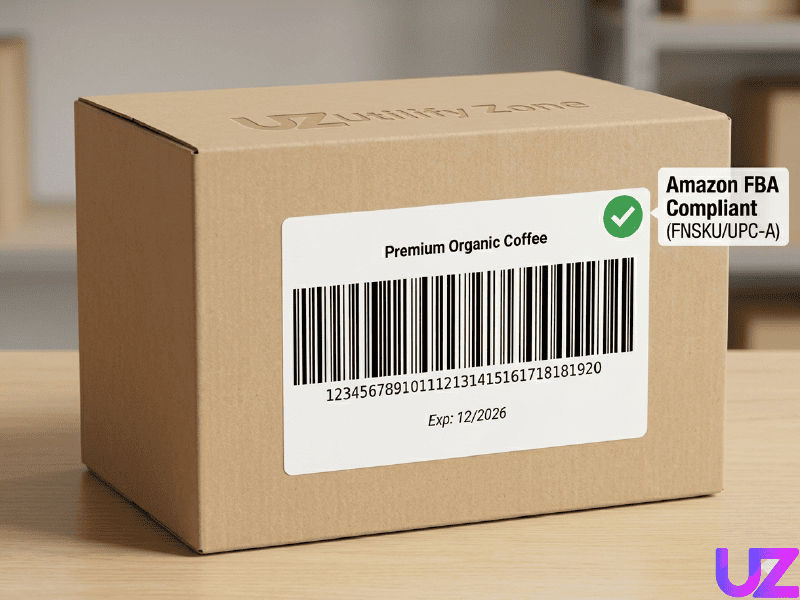
With support for UPC-A symbology and clean formatting, you can:
- Generate compliant product barcodes for FBA shipments
- Add product names or identifiers as custom labels
- Ensure readability for warehouse scanning systems
Speed matters in FBA prep. Instead of relying on slow, login-based tools, Utilifyzone allows sellers to create barcodes instantly and move products into fulfillment faster. This reduces prep time and helps maintain smooth operations during high-volume selling periods.
Inventory Labels with Custom Notes for Warehouse Management
In warehouse environments, barcodes must do more than just scan—they must communicate. Managers need inventory labels with custom notes that include location data, batch numbers, or handling instructions.
Utilifyzone makes it easy to create a barcode generator for warehouse racks with notes, allowing teams to:
- Label shelves, bins, and pallets with structured data
- Add readable notes for staff and logistics teams
- Maintain consistency across large-scale inventory systems
Clear labeling reduces human error, speeds up picking processes, and improves operational efficiency. With instant generation and customizable layouts, warehouse teams can produce high-quality labels on demand without relying on external systems.
Retail Price Tag Generator with EAN-13 Codes
Retail environments require barcodes that are both scanner-ready and customer-friendly. A price tag generator with EAN-13 code allows businesses to create labels that integrate seamlessly with POS systems while displaying product information clearly.
With Utilifyzone, you can:
- Generate EAN-13 barcodes for retail packaging
- Add product names, pricing notes, or promotional text
- Ensure alignment with GS1 compliance standards
This is essential for physical stores and product packaging where presentation and accuracy directly influence sales. Clean, well-structured barcode labels improve checkout speed, reduce scanning errors, and enhance the overall shopping experience.
From Amazon FBA to warehouse logistics and retail shelves, Utilifyzone provides a fast, secure, and scalable solution for modern barcode generation—built to support real business outcomes.
Troubleshooting Fixing Common Barcode Scanning Errors
Even the best barcode generators can produce labels that fail to scan if key technical details are overlooked. In high-volume environments like retail, logistics, and inventory systems, even a small issue—like improper scaling or missing margins—can break the entire workflow.
This section provides a practical, developer-friendly checklist to ensure every barcode you generate is a perfectly scannable image, optimized for both digital use and physical printing.
Managing Scaling, Resolution, and Quiet Zones
One of the most common causes of scanning failure is improper sizing or missing spacing around the barcode. Barcode scanners rely on precise structure and contrast to interpret data correctly.
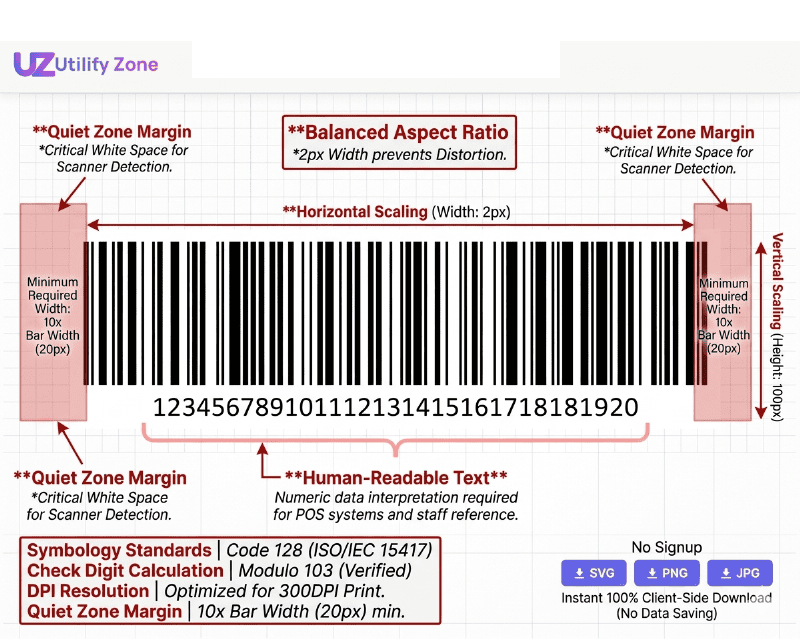
Checklist to fix scaling and rendering issues:
- Ensure a proper quiet zone margin (empty space on both sides of the barcode). Without this, scanners cannot detect the start and end points.
- Avoid stretching or compressing the barcode—always maintain the correct aspect ratio.
- Use vector formats (SVG) instead of raster images to preserve clarity at any size.
- Verify the barcode includes a correct check digit calculation, especially for UPC-A and EAN-13 formats.
- Maintain high contrast (black bars on white background) for optimal scanner recognition.
- Test the barcode at actual print size before mass production.
By following these steps, you ensure your barcode remains structurally accurate and easily readable across different scanning devices.
Ensuring Your Barcode Label is Thermal Printer Compatible
Thermal printers require specific formatting to produce clean, readable labels. Poor optimization can result in faded lines, broken bars, or unreadable codes—especially when printing at scale using direct thermal labels.
Checklist to fix printing and compatibility issues:
- Use high-resolution SVG barcode for print to avoid pixelation or blur.
- Set the correct label size and avoid auto-scaling in printer settings.
- Ensure bar thickness is sufficient for thermal printing (too thin = unreadable).
- Avoid excessive text near the barcode that could interfere with scanning.
- Use high-quality direct thermal labels to maintain print clarity.
- Test output on your specific printer (e.g., Dymo or Zebra) before bulk printing.
Following these best practices ensures your barcode labels are fully compatible with thermal printers and perform reliably in real-world conditions.
By addressing these common issues early, you eliminate scanning errors, reduce operational delays, and maintain a smooth, professional workflow across all barcode use cases.
Frequently Asked Questions (FAQs)
Is this barcode generator free for commercial use?
Yes. Utilifyzone’s tool is 100% free for both personal and commercial use. You can generate unlimited barcodes for retail packaging, warehouse labeling, or Amazon FBA without subscriptions, licensing fees, or usage restrictions.
Can I add a product name above the barcode?
Absolutely. The tool supports custom header text and human-readable text, allowing you to add product names, SKU labels, or descriptive notes above or below the barcode for better clarity and usability.
Do I need to sign up to download SVG barcodes?
No. This is a No-login utility—you can generate and download high-resolution vector SVG format barcodes instantly without creating an account or providing any personal information.
Are these barcodes compatible with Amazon FBA?
Yes. The generator supports formats like UPC-A and EAN-13, which align with Amazon FBA requirements. You can create compliant labels quickly for smooth product intake and fulfillment workflows.
How is my data kept secure?
Our tool uses local JavaScript (Client-side rendering). Your data never leaves your browser and is never stored or logged on any server. This ensures zero data logging and full compliance with modern data privacy standards.
Conclusion: Secure, Fast, and Professional Labeling
Creating professional barcode labels should be simple, fast, and secure—and that’s exactly what Utilifyzone delivers. With a No Signup workflow and a fully client-side processing system, you eliminate delays, protect sensitive data, and generate high-quality barcodes instantly. There’s no server dependency, no tracking, and no hidden limitations—just pure performance and reliability.
Whether you’re an Amazon FBA seller, warehouse manager, or developer building scalable systems, this tool provides everything you need for secure, high-speed barcode generation. Start using the tool now to create scannable, compliant labels in seconds—no friction, no risk, just results.
Essential Resources & Related Tools
Internal Tools (Utilifyzone Ecosystem):
- Real-time QR Code Generator
- Password Generator & Strength Checker
- Bulk Image Converter
- Accessible Color Palette Generator
External Industry Links: