Utilify Zone
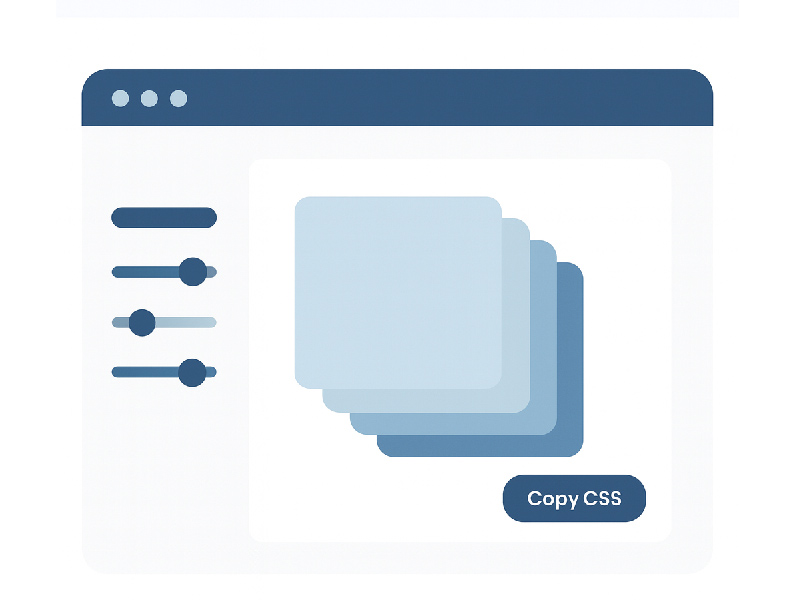
Designers often say that shadows are the “silent storytellers” of a user interface. They shape depth, highlight interactions, and guide attention — yet writing perfect shadow code from scratch can feel surprisingly laborious. That’s exactly why many developers and designers turn to a CSS Box Shadow Generator that runs in the browser, offering a live preview, adjustable settings, and copy-ready CSS.
UtilifyZone provides a powerful, free CSS Box Shadow Generator that lives entirely in the browser. It makes creating custom shadows, inset effects, layered shadows, and modern UI depth both fast and intuitive.
What Is a CSS Box Shadow Generator?
A CSS Box Shadow Generator is an online utility that allows users to visually tweak shadow parameters — like blur, spread, offset, and color — without manually writing the CSS. With tools such as the CSS Box Shadow Generator, users get a live preview of their design changes and can instantly copy the generated code.
As a web-native development tool, it simplifies the process of building compelling UI components by giving direct control over-shadow aesthetics in a friendly, graphical interface.
Visit the tool here:
https://utilifyzone.com/css-box-shadow-generator
Why Web Developers Choose Browser-Based Shadow Tools
- Instant Setup, No Installations
Everything runs in the browser, meaning developers and designers can get started in seconds.
- Cross-Device Access
Use the tool on a laptop, a tablet, or a secondary machine — your work stays consistent.
- Accurate Visual Feedback
Seeing the blur and spread of shadows in real time helps designers experiment with subtle depth or bold effects.
- Reduces Development Friction
Instead of writing and tweaking CSS by hand, users can refine shadows visually and export polished styles ready for production.
- Safe, Local Processing
With UtilifyZone, shadow calculations happen in the browser. No cloud storage or external server needed, helping maintain privacy and speed.
How to Create Custom Shadows with Live Preview
Using CSS Box Shadow Generator, a user can:
- Adjust horizontal and vertical offset
- Set blur radius and spread
- Choose a color (with RGBA support for transparency)
- Toggle inset for inner shadows
- Add multiple layers to stack effects
- Preview changes instantly
- Copy the final CSS or export it for reuse
This online CSS shadow editor experience empowers designers and developers to build anything — from soft UI shading to dramatic, layered effects.
Advanced Shadow Effects: Layered, Inset & Trend-Based Shadows
One of the most powerful features of UtilifyZone’s tool is the ability to create multiple shadow layers. This is especially useful for:
- Soft shadows for neumorphic or minimalist design
- Inset shadows to give a recessed look to cards or input fields
- Realistic UI shadow mastery for modern digital products
With layered shadows, users can combine blur and color settings across different layers, adding depth and sophistication that out-of-the-box presets often miss.
Best CSS Box Shadow Presets for Modern UI
To accelerate design workflows, UtilifyZone also supports shadow presets. These offer pre-configured shadow values for common design patterns like:
- Soft elevated cards
- Buttons with subtle lift
- Input fields with inner or outer shadows
- Neumorphism-style soft UI panels
Presets help users quickly apply complex designs — without spending time manually tuning offsets or colors. This flexibility makes it a preferred CSS box shadow maker for both seasoned UI professionals and beginners.
Copy CSS Shadow Code Instantly and Safely
After fine-tuning the look, users can click a button to copy the CSS code generated by the tool. It supports clean, production-ready CSS, including proper formatting for multiple layers and RGBA shadow colors.
Whether someone is building a responsive card component or a button with depth, they can extract exactly what they need and paste it into their web project. This saves time and reduces the risk of manual typing errors.
Comparison: UtilifyZone vs Other Browser Shadow Tools
Here is how UtilifyZone stacks up against some alternative online CSS shadow generators:
| Feature | (UtilifyZone CSS Box Shadow Generator) | CSSPortal Box Shadow Generator | CSSMatic Box Shadow Editor |
| Live Preview | Yes, instant | Yes | Yes |
| Multiple Shadow Layers | Yes | One layer only | One layer only |
| Inset Shadow Support | Yes | Yes | Yes |
| RGBA / Color Picker | Yes | Yes | Yes |
| Code Export / Copy | Full CSS | CSS only | CSS only |
| Privacy / Data Handling | Local (within browser) | Server processed | Server processed |
| Ads / UI Clutter | Minimal, clean | Moderate ads | High ads / distractions |
- CSSPortal Box Shadow Generator: A known online shadow editor that allows live previews and color picking. However, it only supports a single shadow layer, limiting advanced designs.
- CSSMatic Box Shadow Editor: Another popular tool with a simple UI but lacks multi-layer support and offers a less modern design experience.
Conclusion: While both CSSPortal and CSSMatic are valuable, UtilifyZone stands out with its multi-layered capabilities, inset support, clean UI, and local browser performance, making it a better choice for serious design workflows.
Visit the tool here:
https://utilifyzone.com/css-box-shadow-generator
Practical Use Cases for Web Designers
- Buttons: Apply subtle elevation effects or inset shadows
- Cards / Containers: Use layered shadows to mimic depth
- Inputs & Forms: Create elegant inner shadows that feel tangible
- Cards on Responsive Layouts: Test shadow responsiveness inside the preview area
- UI Trends: Explore neumorphism or glassmorphism shadow effects easily
By using a browser-native design tool, designers save time, reduce mistakes, and maintain consistency across projects.
Best Practices When Using a CSS Box Shadow Generator
- Start with presets: These give a foundation — tweak further if needed.
- Use RGBA colors: Transparency offers more flexible styling.
- Limit the number of shadow layers: Too many can hurt performance.
- Check responsive behavior: Try different preview sizes to ensure shadows look good on mobile.
- Copy only what you need: If you only need one shadow layer, export minimal CSS.
Final Thoughts
In the world of web-native development, where speed and simplicity matter, tools like CSS Box Shadow Generator are game-changers. They let developers and designers move beyond guesswork, craft polished visual styles, and keep everything streamlined — all inside the browser.
By embracing this kind of browser-based development tool, users gain flexibility, reduce friction, and unlock creativity. Whether the UI trend is soft neumorphism or classic card elevation, a good box shadow generator helps make design fast, accessible, and elegant.
If someone isn’t using a shadow generator yet, they’re likely spending more time than they should on shadow tweaking. With UtilifyZone, that changes — instantly.
Visit the tool here:
https://utilifyzone.com/css-box-shadow-generator